Sessions and Persistence
loom’s conversation lifetime is the lifetime of the process. When the process dies, so does the memory of the conversation. To solve this, it might be tempting to simply persist our conversation array, but the array is really not the conversation. It is a window that slides over the conversation. The actual conversation history is a different object with different rules: append-only, never rewritten, and unbound. So far, we have been making the conversation array play both roles.
In this lesson we’re going to persist the session and allow the user to resume it or fork it using a different object: a log of events.
A Log Of Events
A session is not just the messages but it’s a log of things that happened that is immutable, and append-only. So, a file per session, and one line per event. The format we use is JSONL, which is a JSON object per line, newline delimited.
Why go with JSONL rather than, say, a single JSON array? Well, there are very good reasons for that. A JSONL file can be appended without reading, which means adding a line is O(1). If loom crashes, only one line is lost and not the entire session. One corrupt line is also one lost message, all other lines still parse fine.
With the file format out of the way, what should actually go into the record? If we only copy the messages from the conversation array, we are missing half the story. There is a lot more happening in the session that doesn’t appear on the terminal. To capture the full session, we treat it as an event stream with a kind field that identifies the type of the event.
{"kind":"meta","time":"2026-08-02T14:44:01-04:00","model":"gemma4:e4b-mlx","cwd":"/Users/rob/code/loom"}
{"kind":"system","time":"2026-08-02T14:44:01-04:00","message":{"role":"system","content":"You are loom, a coding agent…"}}
{"kind":"message","time":"2026-08-02T14:44:09-04:00","message":{"role":"user","content":"what does clamp.go do?"}}
{"kind":"message","time":"2026-08-02T14:44:11-04:00","message":{"role":"assistant","content":"","tool_calls":[{"function":{"name":"read_file","arguments":{"path":"playground/clamp.go"}}}]}}
{"kind":"message","time":"2026-08-02T14:44:11-04:00","message":{"role":"tool","tool_name":"read_file","content":"package playground\n\nfunc Clamp(v, lo, hi int) int {…"}}
{"kind":"message","time":"2026-08-02T14:44:14-04:00","message":{"role":"assistant","content":"It pins a value between lo and hi."}}
{"kind":"compact","time":"2026-08-02T15:02:44-04:00","summary":"* User goal: understand the playground helpers…"}
Let’s walk through the lifecycle of the session to see how this works.
The Session Opens (“kind”: “meta”)
Record the environment. Which model is running? What directory is the user in?
{"kind":"meta","time":"2026-08-02T14:44:01-04:00","model":"gemma4:e4b-mlx","cwd":"/Users/rob/code/orb"}
The Rules (“kind”: “system”)
The system prompt dictates the agent’s constraints. Log it to capture the baseline instruction.
{"kind":"system","time":"2026-08-02T14:44:01-04:00","message":{"role":"system","content":"You are orb, a coding agent…"}}
The Conversation (“kind”: “message”)
The back-and-forth conversation is captured as an entire message object so the roles and tool calls are preserved as part of the message.
{"kind":"message","time":"2026-08-02T14:44:09-04:00","message":{"role":"user","content":"what does clamp.go do?"}}
{"kind":"message","time":"2026-08-02T14:44:11-04:00","message":{"role":"assistant","content":"","tool_calls":[{"function":{"name":"read_file","arguments":{"path":"playground/clamp.go"}}}]}}
{"kind":"message","time":"2026-08-02T14:44:11-04:00","message":{"role":"tool","tool_name":"read_file","content":"package playground\n\nfunc Clamp(v, lo, hi int) int {…"}}
{"kind":"message","time":"2026-08-02T14:44:14-04:00","message":{"role":"assistant","content":"It pins a value between lo and hi."}}
The Compaction Event (“kind”: “compact”)
We capture the summary as a compaction event.
{"kind":"compact","time":"2026-08-02T15:02:44-04:00","summary":"* User goal: understand the playground helpers…"}
Notice that this is the main difference between the session and the conversation array. The session captures compaction as the event but it doesn’t lose anything that came before. The session file only ever grows and by logging events it maintains a perfect, immutable ledger of what was said, what the model saw, and exactly when it forgot it.
Algorithm 1: Write to the conversation and the session
Right now we call append function to add a message to the conversation, but we need to change that to write to two places. So this algorithm is about introducing a helper function add to do this for us.
- Nothing appends to the conversation array directly. Every append goes through one function
add. addappends the messages to the window and writes onemessagerecord to the log, in the same call.- When
compact()rebuilds the window, it writes onecompactrecord itself, inside the function, not at its two call sites, so that the manual/compactand the automatic trigger don’t drift apart.
Algorithm 2: Replay
Now we go in the other direction. /resume is handed a file and has to produce a conversation the model can use. As you may guess, this isn’t as simple as just blindly copying messages into the conversation array.
- A message record is appended exactly as the live loop appends it.
- A compact record reruns
compact()with the summary read from the session event. - The system prompt is regenerated.
- If what comes out ends with an assistant message whose tool calls never got their results, drop it.
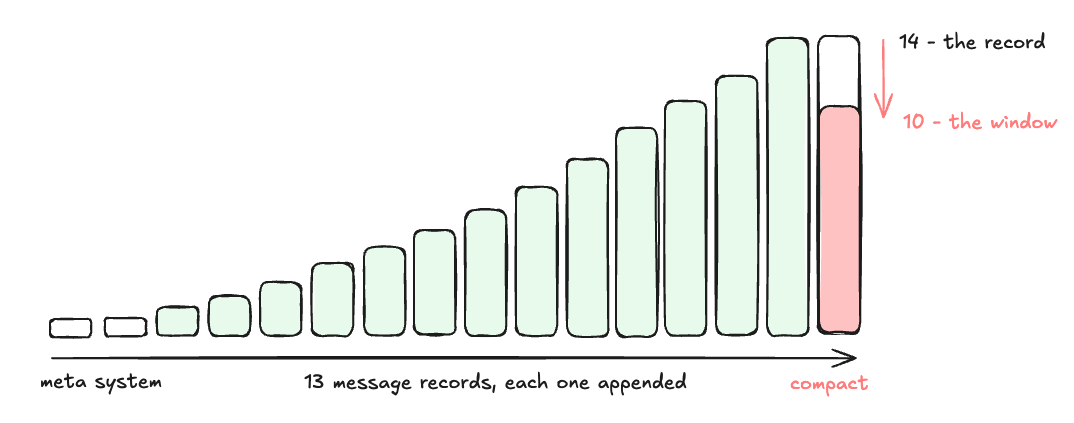 the fold walks the same staircase the live loop walked
The rebuilt window cannot be bigger than the one that was left. Every compaction that shrank the window live, shrinks it again here. Note, that we don’t perform summary but use the one from the log and just run compact(). compact() must not write to the log in this case.
Step 1: Your Turn
Try to build it yourself first. Here is what you need to do:
- A session is a file:
~/.loom/sessions/<id>.jsonl, where the id is a timestamp (20060102-150405) so that ids sort chronologically as plain strings. This way you get newest first from string sort without parsing dates. Create the session file at startup withO_CREATE|O_EXCL|O_WRONLY|O_APPEND.O_EXCLis what stops two looms started on the same second from interleaving into one file. Directory0700and file0600. The first line is ametarecord with model name, working directory, and for forks, the id this branched from. - One record per line, typed by kind. A Go struct with a
Kindfield andomitemptyon everything optional. - A helper function to write to the window and the log:
add(conversation *[]Message, msgs ...Message). - Compaction logs an event with a line like
{"kind":"compact", "summary":"..."}after callingcompact(). Leavecompact()itself a pure function. It’s about to be called again by the replay and it shouldn’t be logging. - For replay, seed a window with a fresh system message, then walk the file applying each record: append a
message, re-runcompact()on acompactrecord. What you get back is the conversation array as it stood in the previous session. /resumewith or without an argument. Base/resumelists the ten most recent sessions: id, message count, a preview of the first user message, and a marker on the current one./resume <id>rebuilds the window from the log and continues appending to the same file.- Append a framed user role message noting that the session was reopened and files may have changed since.
/fork <id>. Rebuild the window from a source log, then write it into a new file whosemetarecordsforked_from. Bare/forkbranches the current session, which is useful if you want to try something risky./clearstarts a new session instead of erasing one. Close the old log, open a new one, and start a fresh window.- At startup show
session <id>. - Skip lines that won’t parse, count them, and warn.
As usual, try to build it yourself. When you’re ready to validate your implementation or need help, here is an in-depth explanation of the code.
First define types and variables. This goes above func runTurn:
const maxLogLine = 16 * 1024 * 1024 // a logged tool result can be enormous

// record is one line of the log. Kind says how to read the rest: "meta"
// opens a file, "system" and "message" carry a Message, and "compact"
// carries the summary the window was rebuilt around.
type record struct {
	Kind       string   `json:"kind"`
	Time       string   `json:"time"`
	Model      string   `json:"model,omitempty"`
	Cwd        string   `json:"cwd,omitempty"`
	ForkedFrom string   `json:"forked_from,omitempty"`
	Message    *Message `json:"message,omitempty"`
	Summary    string   `json:"summary,omitempty"`
}

type Session struct {
	ID   string
	Path string
	f    *os.File
}

// session is nil when logging is unavailable and every method below
// tolerates a nil receiver, so no call site has to check.
var session *Session

func sessionsDir() string {
	return filepath.Join(loomHome(), "sessions")
}
Next, the log function to append one record:
func (s *Session) log(r record) {
	if s == nil {
		return
	}

	r.Time = time.Now().Format(time.RFC3339)
	data, err := json.Marshal(r)
	if err != nil {
		fmt.Fprintln(os.Stderr, "warning: session log encode failed:", err)
		return
	}

	// json.Marshal escapes newlines, so one record is always one line.
	if _, err := s.f.Write(append(data, '\n')); err != nil {
		fmt.Fprintln(os.Stderr, "warning: session log write failed:", err)
	}
}

func (s *Session) close() {
	if s != nil {
		s.f.Close()
	}
}
Opening a session can either succeed or return a nil session:
// openSession creates a new log file and writes its meta line. The id is
// a timestamp, so ids sort chronologically as plain strings.
func openSession(forkedFrom string) *Session {
	if err := os.MkdirAll(sessionsDir(), 0o700); err != nil {
		fmt.Fprintln(os.Stderr, "warning: session logging disabled:", err)
		return nil
	}

	base := time.Now().Format("20060102-150405")
	for n := 0; n < 100; n++ {
		id := base
		if n > 0 {
			id = fmt.Sprintf("%s-%d", base, n)
		}

		// O_EXCL: two looms started in the same second get separate logs.
		path := filepath.Join(sessionsDir(), id+".jsonl")
		f, err := os.OpenFile(path, os.O_CREATE|os.O_EXCL|os.O_WRONLY|os.O_APPEND, 0o600)
		if os.IsExist(err) {
			continue
		}
		if err != nil {
			fmt.Fprintln(os.Stderr, "warning: session logging disabled:", err)
			return nil
		}

		cwd, _ := os.Getwd()
		s := &Session{ID: id, Path: path, f: f}
		s.log(record{Kind: "meta", Model: model, Cwd: cwd, ForkedFrom: forkedFrom})
		return s
	}

	fmt.Fprintln(os.Stderr, "warning: session logging disabled: no free id")
	return nil
}

// reopenSession appends to an existing log, so resuming a session
// continues its record instead of starting a second one beside it.
func reopenSession(id string) *Session {
	path := filepath.Join(sessionsDir(), id+".jsonl")
	f, err := os.OpenFile(path, os.O_WRONLY|os.O_APPEND, 0o600)
	if err != nil {
		fmt.Fprintln(os.Stderr, "warning: cannot append to session log:", err)
		return nil
	}

	return &Session{ID: id, Path: path, f: f}
}
Both newWindow and add functions write to the conversation and the log:
// newWindow starts a fresh conversation and records the system prompt it
// was built with. The prompt is logged for the human reading the
// transcript later. Replay regenerates it rather than replaying it.
func newWindow() []Message {
	sys := Message{Role: "system", Content: systemPrompt()}
	session.log(record{Kind: "system", Message: &sys})
	return []Message{sys}
}

func add(conversation *[]Message, msgs ...Message) {
	for _, m := range msgs {
		*conversation = append(*conversation, m)
		session.log(record{Kind: "message", Message: &m})
	}
}
scanLog walks a log file, handing each parsed record to fn. If a line doesn’t
parse, it’s skipped:
func scanLog(path string, fn func(record)) error {
	f, err := os.Open(path)
	if err != nil {
		return err
	}
	defer f.Close()

	sc := bufio.NewScanner(f)
	sc.Buffer(make([]byte, 0, 64*1024), maxLogLine)

	bad := 0
	for sc.Scan() {
		if strings.TrimSpace(sc.Text()) == "" {
			continue
		}

		var r record
		if err := json.Unmarshal(sc.Bytes(), &r); err != nil {
			bad++
			continue
		}

		fn(r)
	}

	if bad > 0 {
		fmt.Fprintf(os.Stderr, "  warning: skipped %d unreadable line(s) in %s\n", bad, path)
	}

	return sc.Err()
}
replay rebuilds the window as it stood when the process last wrote to the log. Records are not collected, they are applied. A message record is appended the way the live loop appended it, and a compact record re-runs compact() with the summary written that day. What comes out should be the same as what the model was looking at before.
func replay(id string) ([]Message, error) {
	window := []Message{{Role: "system", Content: systemPrompt()}}

	err := scanLog(filepath.Join(sessionsDir(), id+".jsonl"), func(r record) {
		switch r.Kind {
		case "message":
			if r.Message != nil {
				window = append(window, *r.Message)
			}

		case "compact":
			// The same function the live loop called, on the same
			// messages, with the same summary. This is why compact() must
			// not write to the log: replaying an event is not the event.
			window = compact(window, r.Summary)
		}
	})

	return window, err
}
dropOrphanedCalls trims a turn that a crash cut in half, that is, an assistant message whose tool calls never got their results. Every call must be answered, so resuming into state should not produce state that couldn’t happen.
func dropOrphanedCalls(msgs []Message) []Message {
	for i := len(msgs) - 1; i >= 0; i-- {
		if msgs[i].Role == "tool" {
			continue
		}

		if msgs[i].Role == "assistant" && len(msgs[i].ToolCalls) > len(msgs[i+1:]) {
			return msgs[:i]
		}

		break
	}

	return msgs
}
resumeWindow turns a log back into a live conversation: the rebuilt window, minus a turn that a crash cut in half, plus one line saying that time has passed.
func resumeWindow(id string) ([]Message, error) {
	window, err := replay(id)
	if err != nil {
		return nil, err
	}

	window = dropOrphanedCalls(window)
	window = append(window, Message{Role: "user", Content: fmt.Sprintf(
		"[Session %s reopened. Time has passed since the messages above and "+
			"file contents may have changed; re-read any file before editing it.]", id)})

	return window, nil
}
Last, the listing of available sessions when /resume is called without arguments.
type sessionInfo struct {
	ID, Started, First string
	Msgs               int
}

// listSessions summarizes the most recent logs, newest first.
func listSessions(limit int) []sessionInfo {
	paths, _ := filepath.Glob(filepath.Join(sessionsDir(), "*.jsonl"))
	slices.Sort(paths) // ids are timestamps, so lexical order is chronological

	var out []sessionInfo
	for i := len(paths) - 1; i >= 0 && len(out) < limit; i-- {
		info := sessionInfo{ID: strings.TrimSuffix(filepath.Base(paths[i]), ".jsonl")}
		err := scanLog(paths[i], func(r record) {
			switch r.Kind {
			case "meta":
				info.Started = r.Time

			case "message":
				if r.Message == nil {
					return
				}
				info.Msgs++
				if info.First == "" && r.Message.Role == "user" {
					info.First = preview(*r.Message, 44)
				}
			}
		})
		// A loom that started and was never spoken to leaves a log with no
		// messages in it; only the current one is worth showing.
		if err != nil || (info.Msgs == 0 && (session == nil || info.ID != session.ID)) {
			continue
		}

		out = append(out, info)
	}

	return out
}

func printSessions() {
	infos := listSessions(10)
	if len(infos) == 0 {
		fmt.Println("  no saved sessions yet")
		return
	}

	fmt.Println("  recent sessions (newest first, * = current):")
	for _, in := range infos {
		marker := " "
		if session != nil && in.ID == session.ID {
			marker = "*"
		}
		fmt.Printf("  %s %-17s %4d msg  %s\n", marker, in.ID, in.Msgs, in.First)
	}

	fmt.Println("  /resume <id> to continue one - /fork <id> to branch it")
}
The compact trigger needs to write a record to the log. Change this in the runTurn function:
*ctxSize = max(estimateTokens(*conversation), used)

if *ctxSize > compactAt {
    fmt.Printf("\n   [compacting %d messages, ctx %d/%d]\n",
        len(*conversation), ctxSize, numCtx)
    summary, err := summarize(context.Background(), *conversation)
    if err != nil {
        fmt.Fprintln(os.Stderr, "compaction failed, continuing:", err)
    } else {
        *conversation = compact(*conversation, summary)
        session.log(record{Kind: "compact", Summary: summary})
        *ctxSize = estimateTokens(*conversation)
    }
}
Now, every append in runTurn becomes an add function call.
After the reply arrives:
		add(conversation, reply)
				}
				return
			}
			fmt.Fprintln(os.Stderr, "error:", err)
			return
		}

		add(conversation, reply)

		for _, tc := range reply.ToolCalls {
For the tool result:
add(conversation, Message{
    Role:     "tool",
    ToolName: tc.Function.Name,
    Content:  result,
})
In main, the session opens immediately at the start:
	scanner := bufio.NewScanner(os.Stdin)

	session = openSession("")
	defer func() { session.close() }()
Print the session report and create the conversation using newWindow():
	if session != nil {
		report = append(report, "session "+session.ID)
	}
	fmt.Println("  context: " + strings.Join(report, " · "))

	conversation := newWindow()
Then the command /clear creates a new session:
{"/clear", "start a fresh session", func(string) {
    session.close()
    session = openSession("")
    conversation = newWindow()
    ctxSize = 0
    fmt.Println("  session cleared")
    if session != nil {
        fmt.Println("  now logging to " + session.ID)
    }
}},
And define /resume:
{"/resume", "list sessions, or resume one by id", func(arg string) {
    id := strings.TrimSpace(arg)
    if id == "" {
        printSessions()
        return
    }

    window, err := resumeWindow(id)
    if err != nil {
        fmt.Fprintln(os.Stderr, "  cannot resume:", err)
        return
    }

    s := reopenSession(id)
    if s == nil {
        return
    }

    session.close()
    session = s

    session.log(record{Kind: "system", Message: &window[0]})
    conversation = window
    ctxSize = estimateTokens(conversation)
    fmt.Printf("  resumed %s - window rebuilt: %d messages, ~%d tokens\n",
        id, len(conversation), ctxSize)
}},
/fork is /resume with one line changed, openSession(id) instead of reopenSession(id), plus replaying the inherited window into the new file so the branch can be read without its parent.
{"/fork", "branch a session into a new log", func(arg string) {
    id := strings.TrimSpace(arg)
    if id == "" {
        if session == nil {
            fmt.Println("  no current session to fork")
            return
        }
        id = session.ID
    }

    window, err := resumeWindow(id)
    if err != nil {
        fmt.Fprintln(os.Stderr, "  cannot fork:", err)
        return
    }

    s := openSession(id)
    if s == nil {
        return
    }

    session.close()
    session = s

    session.log(record{Kind: "system", Message: &window[0]})
    conversation = []Message{window[0]}
    add(&conversation, window[1:]...)
    ctxSize = estimateTokens(conversation)
    fmt.Printf("  forked %s into %s - %d messages carried over\n",
        id, s.ID, len(conversation)-1)
}},
Update /compact to also log:
{"/compact", "compact the conversation now", func(string) {
    before := estimateTokens(conversation)
    summary, err := summarize(context.Background(), conversation)
    if err != nil {
        fmt.Fprintln(os.Stderr, "compaction failed, conversation untouched:", err)
        return
    }
    conversation = compact(conversation, summary)
    session.log(record{Kind: "compact", Summary: summary})
    fmt.Printf("  compacted: ~%d → ~%d tokens\n", before, estimateTokens(conversation))
}},
And the last two appends, in the skill command:
add(&conversation, Message{Role: "user", Content: body})
and the input loop:
add(&conversation, Message{Role: "user", Content: input})
Step 2: Test It
Build loom and run it. First start as normal and tell it to read playground/clamp.go and explain what it does. Compact so we can capture the event for our test. Then /context to see the window. Quit session. Restart /resume to see available session logs and then /resume <id> with the id of the previous session. /context to compare the window with the previous session, which should match, plus the new session message. Also ask loom which file we read and it should correctly answer clamp.go based on the restored window.
❯ go run ./cmd/loom
loom v0.11 - chatting with gemma4:e4b-mlx (ctrl-c to quit)
this directory offers loom config: AGENTS.md, 1 skill(s)
load it? [y]es this session / [a]lways / [n]o: y
context: project AGENTS.md (trusted) · skills: 0 global, 1 repo · session 20260918-182854
❯ read playground/clamp.go and tell me what it does
The user wants to know what the file `playground/clamp.go` does. I need to read the file contents first. ⚙ read_file(map[path:playground/clamp.go])
The user asked me to read `playground/clamp.go` and tell them what it does.
I have read the file.
The file `playground/clamp.go` contains the following code:
package playground
// Clamp limits v to the range [lo, hi].
func Clamp(v, lo, hi int) int {
if v < lo {
return lo
}
if v > hi {
return hi
}
return v
}
This function `Clamp(v, lo, hi int) int` limits the value `v` to the range defined by `lo` (lower bound) and `hi` (upper bound). If `v` is less than `lo`, it returns `lo`. If `v` is greater than `hi`, it returns `hi`. Otherwise, it returns `v`.
I will summarize this in my response.
loom: The file `playground/clamp.go` defines a function named `Clamp`.
This function takes three integers: `v` (the value to clamp), `lo` (the lower bound), and `hi` (the upper bound). It returns the value of `v` constrained to the range [`lo`, `hi`].
Specifically:
1. If `v` is less than `lo`, it returns `lo`.
2. If `v` is greater than `hi`, it returns `hi`.
3. Otherwise (if `v` is within the range), it returns `v`.
[ctx 1098/131072]
❯ /compact
compacted: ~438 → ~626 tokens
❯ /context
── conversation x-ray ──────────────────────────────────────────
#0 system ~264 tok You are loom, a coding agent. You comple…
#1 user ~188 tok [Context summary - earlier messages were…
#2 user ~12 tok read playground/clamp.go and tell me wha…
#3 assistant ⚙ read_file ~19 tok (1 tool call(s), no text)
#4 tool ⇐ read_file ~40 tok package playground// Clamp limits v to…
#5 assistant ~103 tok The file `playground/clamp.go` defines a…
────────────────────────────────────────────────────────────────
6 messages · ~626 tokens estimated · budget 131072 · compacts at 104857
❯ ^Csignal: interrupt
❯ go run ./cmd/loom
loom v0.11 - chatting with gemma4:e4b-mlx (ctrl-c to quit)
this directory offers loom config: AGENTS.md, 1 skill(s)
load it? [y]es this session / [a]lways / [n]o: y
context: project AGENTS.md (trusted) · skills: 0 global, 1 repo · session 20260918-183154
❯ /resume
recent sessions (newest first, * = current):
* 20260918-183154 0 msg
20260918-182854 4 msg read playground/clamp.go and tell me what it…
20260918-182615 4 msg read playground/clamp.go and tell me what it…
/resume <id> to continue one - /fork <id> to branch it
❯ /resume 20260918-182615
resumed 20260918-182615 - window rebuilt: 6 messages, ~473 tokens
❯ /context
── conversation x-ray ──────────────────────────────────────────
#0 system ~264 tok You are loom, a coding agent. You comple…
#1 user ~12 tok read playground/clamp.go and tell me wha…
#2 assistant ⚙ read_file ~19 tok (1 tool call(s), no text)
#3 tool ⇐ read_file ~40 tok package playground// Clamp limits v to…
#4 assistant ~101 tok The file `playground/clamp.go` defines a…
#5 user ~37 tok [Session 20260918-182615 reopened. Time …
────────────────────────────────────────────────────────────────
6 messages · ~473 tokens estimated · budget 131072 · compacts at 104857
❯ what file did we read?
The user is asking what file was read in the previous turn. I should look at the history to answer this. The previous turn contained the instruction "read playground/clamp.go and tell me what it does", and the tool call was `read_file{path:<|"|>playground/clamp.go<|"|>}`.
loom: We read `playground/clamp.go`.
[ctx 1023/131072]
Where to Go From Here
We started this series with Feynman’s premise: “What I cannot create, I do not understand.”
Over the last eleven lessons, you peeled away the mystery behind modern agents.
Now, loom belongs to you.
The best way to solidify what you’ve learned is to play with it, break it, push its edges, and make it fit how you work.
Here are some ideas of things you could do:
- Tackle harder workflows: Add a sub-agent architecture for planning, wire up vector search for codebase-wide retrieval, or experiment with native git checkpoints before every destructive tool call.
- Stress-test your trust boundaries: Try tricking your own agent with adversarial prompts embedded in local files to see where your permission layer holds and where it bends.
You have the foundation. Now go build what’s next.
Code
You can find full code on GitHub.