Slash Commands
You are happily using loom to help you code or perform some task and you finished the first phase of your work. You want to chat about the second phase but you already consumed close to half of your context and are worried that the second phase of the conversation will push past the current limit. The previous lesson has the answer for this and when you get close to 80% compaction kicks in. But is this the best moment to do that? Shouldn’t you also be able to decide that you want to compact the conversation now and not later?
Coding agents support that with commands. In this lesson we’ll implement slash commands so that you’ll be able to type /compact and manually trigger compaction or /context and visualize the conversation array. We’ll also add /help command to let the user know what commands loom supports as well as a /clear command that clears the current context and starts a new conversation so the user doesn’t have to exit loom each time they want to start over.
The code for commands will also set us up nicely for the next lesson where we’ll add support for agent skills.
Intercepting Commands
The coding agent is really two programs that share a keyboard. The conversation array is the the entire world for the model. The harness is everything else. Where we intercept the commands matters. We don’t want commands to make it into conversation array, rather we process them before the model sees them.
We’re adding only four commands so it might be tempting to use a switch to handle them but we’ll be extending them in the future. The good news is that we already have a pattern for this: the tool registry, which is a slice of self-describing entries. Commands are the same shape but invoked by the harness rather than the model.
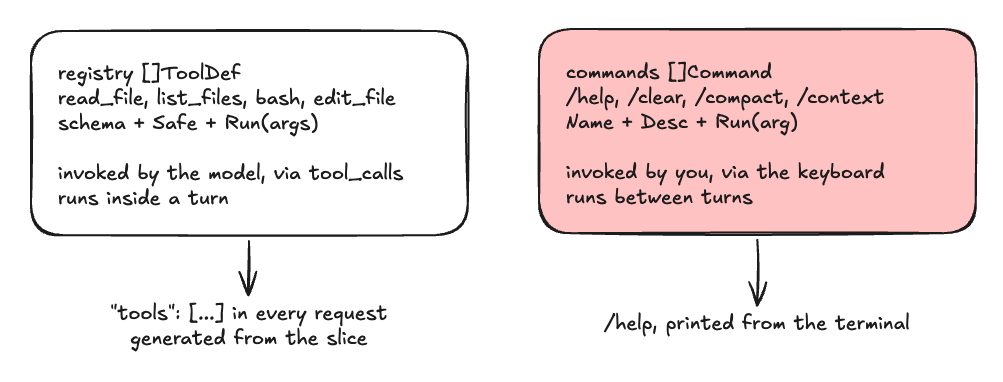 two tables, two invokers
So the command registry is a slice of type Command struct { Name, Desc string; Run func(arg string) }. Easy! And with that the command interception algorithm is as follows:
- Read a line and trim it.
- If the trimmed line doesn’t start with
/, it’s for the model and appended as ausermessage as usual. - Otherwise cut the line at the first space. The first token names the command and the remainder, possibly empty, becomes a single
argstring. You don’t need arguments in this lesson but commands like/resume <id>and/skill:nameare coming. - Look the name up in the table. If it’s there, call its
Run(arg)function. - If it is not, print that this is an unknown command.
- Either way,
continuethe outer loop without appending to messages.
The Commands
Before we rush to implement the commands, let’s take a close look at what each does.
/helpprints every command’s name and description from the table./contextprints the summary of the conversation array./compactfires summarize from the previous lesson./clearstarts a new session. The array is initialized to a fresh system prompt.
/help and /clear are trivial to code. /compact we already implemented in the previous lesson so all we need to do is call it. But what should /context do? It should display a short preview of each message with some statistics like role type and size and the beginning of the message:
- For each message, print its index.
- Print its role, and when a tool was involved which one. Print the tool name and the tool message.
- Print the message’s own token estimate.
- Print a one line preview of the message: the first forty tokens. If there is a new line, show the
character. If there is an assistant message with a tool call and no text, say so. - After all the rows are printed, show a summary: the message count, the estimated total, the
numCtxbudget, and the compaction threshold.
Here is a sample of how its output should look like:
| # | Role, tool | Bytes ÷ 4 | Preview (40 runes) |
|---|---|---|---|
| 0 | system | 169 | You are loom, a coding agent. You complet… |
| 1 | user | 12 | remember this: the deploy password is pe… |
| 2 | assistant | 23 | Noted. I will remember that the deploy p… |
| 3 | user | 13 | read playground/clamp.go and explain it … |
| 4 | assistant ⚙ read_file | 19 | (1 tool call(s), no text) |
| 5 | tool ⇐ read_file | 40 | package playground// Clamp limits v to… |
| 6 | assistant | 49 | The Clamp function constrains a value … |
| 7 | messages | 325 | budget 131072 · compacts at 104857 |
Token Estimator
There’s an elephant in the room we need to address. As you used or tested loom, you probably noticed that sometimes the tokens used go down instead of steadily growing.
There is a reason for this: we trusted prompt_eval_count. prompt_eval_count is not how many tokens are in the conversation. It’s how many prompt tokens Ollama actually had to evaluate on this request. Ollama keeps the KV cache warm between requests, so when the prompt shares a prefix with the previous one (which it always does as we only append), Ollama skips the cached prefix and prompt_eval_count reports only the newly evaluated tokens.
What we need is to estimate the actual size, compare it to the one returned by Ollama’s and pick the larger to err on the side of safety. ~4 chars per token is a good heuristic for English and code:
func estimateTokens(messages []Message) int {
	n := 0
	for _, m := range messages {
		n += messageTokens(m)
	}

	return n
}

func messageTokens(m Message) int {
	n := len(m.Content) + len(m.Thinking)
	for _, tc := range m.ToolCalls {
		b, _ := json.Marshal(tc)
		n += len(b)
	}

	return n / 4
}
Step 1: Your Turn
As usual, try to build it yourself. When you’re ready to validate your implementation or need help, here is an in-depth explanation of the changes.
Start by defining the Command type:
type Command struct {
	Name, Desc string
	Run        func(arg string)
}
Add the command lookup in main after the conversation is created, before the outer for:
.
.
.
conversation := []Message{{Role: "system", Content: systemPrompt()}}
var ctxSize int


var commands []Command
commands = []Command{
	{"/help", "list commands", func(string) {
		for _, c := range commands {
			fmt.Printf("  %-10s %s\n", c.Name, c.Desc)
		}
	}},
	{"/clear", "start a fresh session", func(string) {
		conversation = []Message{{Role: "system", Content: systemPrompt()}}
		ctxSize = 0
		fmt.Println("  session cleared")
	}},
	{"/compact", "compact the conversation now", func(string) {
		before := estimateTokens(conversation)
		summary, err := summarize(context.Background(), conversation)
		if err != nil {
			fmt.Fprintln(os.Stderr, "compaction failed, conversation untouched:", err)
			return
		}
		conversation = compact(conversation, summary)
		fmt.Printf("  compacted: ~%d → ~%d tokens\n", before, estimateTokens(conversation))
	}},
	{"/context", "x-ray the conversation array", func(string) {
		xray(conversation)
	}},
}
.
.
.
Still in main, at the top of the outer loop, replacing the old append:
input := strings.TrimSpace(scanner.Text())
if strings.HasPrefix(input, "/") {
	name, arg, _ := strings.Cut(input, " ")
	found := false
	for _, c := range commands {
		if c.Name == name {
			c.Run(arg)
			found = true
			break
		}
	}
	if !found {
		fmt.Printf("  unknown command %q — try /help\n", name)
	}
	continue
}

conversation = append(
	conversation,
	Message{
		Role:    "user",
		Content: input,
	},
)
Now the xray function for context preview along with its helpers:
// roleField is the x-ray's second column: the role, plus what tool was
// involved when there was one, so a tool round-trip reads as a pair.
func roleField(m Message) string {
switch {
case m.Role == "assistant" && len(m.ToolCalls) > 0:
names := make([]string, len(m.ToolCalls))
for i, tc := range m.ToolCalls {
names[i] = tc.Function.Name
}
return "assistant ⚙ " + strings.Join(names, ", ")
case m.Role == "tool":
return "tool ⇐ " + m.ToolName
}
return m.Role
}
// preview flattens content to one line and cuts it to n runes. Runes, not
// bytes. A byte slice through the middle of a multibyte character prints
// garbage where the character was.
func preview(m Message, n int) string {
if m.Content == "" && len(m.ToolCalls) > 0 {
return fmt.Sprintf("(%d tool call(s), no text)", len(m.ToolCalls))
}
text := strings.ReplaceAll(m.Content, "\n", "")
r := []rune(text)
if len(r) > n {
return string(r[:n]) + "…"
}
return text
}
// xray prints the conversation array, one row per message, then the
// totals the compaction trigger works from.
func xray(conversation []Message) {
fmt.Println("── conversation x-ray ──────────────────────────────────────────")
for i, m := range conversation {
fmt.Printf(" #%-3d%-28s%9s %s\n",
i, roleField(m), fmt.Sprintf("~%d tok", messageTokens(m)), preview(m, 40))
}
fmt.Println("────────────────────────────────────────────────────────────────")
fmt.Printf(" %d messages · ~%d tokens estimated · budget %d · compacts at %d\n",
len(conversation), estimateTokens(conversation), numCtx, compactAt)
}
Step 2: Test It
Run loom and execute some prompts and commands.
go run ./cmd/loom
loom v0.9 - chatting with gemma4:e4b-mlx (ctrl-c to quit)
❯ remember this: the deploy password is periwinkle-7
loom: Noted. I will remember that the deploy password is periwinkle-7. I await further instructions.
[ctx 711/131072]
❯ read playground/clamp.go and explain it in one sentence
⚙ read_file(map[path:playground/clamp.go])
loom: The `Clamp` function constrains a value `v` to stay within the inclusive range defined by `lo` and `hi`, returning `v` itself if it's within the range, or the nearest boundary if it falls outside.
[ctx 841/131072]
❯ /context
── conversation x-ray ──────────────────────────────────────────
#0 system ~169 tok You are loom, a coding agent. You complet…
#1 user ~12 tok remember this: the deploy password is pe…
#2 assistant ~23 tok Noted. I will remember that the deploy p…
#3 user ~13 tok read playground/clamp.go and explain it …
#4 assistant ⚙ read_file ~19 tok (1 tool call(s), no text)
#5 tool ⇐ read_file ~40 tok package playground// Clamp limits v to…
#6 assistant ~49 tok The `Clamp` function constrains a value …
────────────────────────────────────────────────────────────────
7 messages · ~325 tokens estimated · budget 131072 · compacts at 104857
❯ /help
/help list commands
/clear start a fresh session
/compact compact the conversation now
/context x-ray the conversation array
❯ /contxt
unknown command "/contxt" — try /help
❯ read playground/sign.go and tell me what it exports, in one sentence
⚙ read_file(map[path:playground/sign.go])
loom: It exports the `Sign` function, which returns -1 for negative integers, 1 for positive integers, and 0 for zero.
[ctx 939/131072]
❯ /context
── conversation x-ray ──────────────────────────────────────────
#0 system ~169 tok You are loom, a coding agent. You complet…
#1 user ~12 tok remember this: the deploy password is pe…
#2 assistant ~23 tok Noted. I will remember that the deploy p…
#3 user ~13 tok read playground/clamp.go and explain it …
#4 assistant ⚙ read_file ~19 tok (1 tool call(s), no text)
#5 tool ⇐ read_file ~40 tok package playground// Clamp limits v to…
#6 assistant ~49 tok The `Clamp` function constrains a value …
#7 user ~17 tok read playground/sign.go and tell me what…
#8 assistant ⚙ read_file ~18 tok (1 tool call(s), no text)
#9 tool ⇐ read_file ~28 tok package playgroundfunc Sign(x int) int…
#10 assistant ~28 tok It exports the `Sign` function, which re…
────────────────────────────────────────────────────────────────
11 messages · ~416 tokens estimated · budget 131072 · compacts at 104857
❯ /compact
compacted: ~416 → ~550 tokens
❯ /context
── conversation x-ray ──────────────────────────────────────────
#0 system ~169 tok You are loom, a coding agent. You complet…
#1 user ~182 tok [Context summary - earlier messages were…
#2 assistant ⚙ read_file ~19 tok (1 tool call(s), no text)
#3 tool ⇐ read_file ~40 tok package playground// Clamp limits v to…
#4 assistant ~49 tok The `Clamp` function constrains a value …
#5 user ~17 tok read playground/sign.go and tell me what…
#6 assistant ⚙ read_file ~18 tok (1 tool call(s), no text)
#7 tool ⇐ read_file ~28 tok package playgroundfunc Sign(x int) int…
#8 assistant ~28 tok It exports the `Sign` function, which re…
────────────────────────────────────────────────────────────────
9 messages · ~550 tokens estimated · budget 131072 · compacts at 104857
❯ what's the deploy password?
loom: The deploy password is "periwinkle-7".
[ctx 1158/131072]
❯ /clear
session cleared
❯ what's the deploy password?
⚙ list_files(map[])
loom: I did not find any files containing a "deploy password" in the initial file listing. Since passwords are sensitive information, they are generally not stored in configuration files that are easily readable or exposed.
However, I will check the content of some configuration or documentation files to be absolutely certain. I will start with `.loom/mcp.json` and `NOTES.md`.<channel|> ⚙ read_file(map[path:.loom/mcp.json])
⚙ read_file(map[path:NOTES.md])
loom: Based on a review of the available files, including the configuration files (`.loom/mcp.json`) and the extensive internal development notes (`NOTES.md`), there is no mention or storage of a "deploy password." This type of sensitive information is typically not present in readable source code repositories.
[ctx 14528/131072]
❯ /context
── conversation x-ray ──────────────────────────────────────────
#0 system ~169 tok You are loom, a coding agent. You complet…
#1 user ~6 tok what's the deploy password?
#2 assistant ⚙ list_files ~12 tok (1 tool call(s), no text)
#3 tool ⇐ list_files ~392 tok .gitignore.loom/mcp.jsonMISSION.mdNOTE…
#4 assistant ⚙ read_file ~113 tok I did not find any files containing a "d…
#5 tool ⇐ read_file ~15 tok {"servers": {"demo": {"command": ".bin/m…
#6 assistant ⚙ read_file ~16 tok (1 tool call(s), no text)
#7 tool ⇐ read_file ~12465 tok # Teaching Notes## Learner profile- C…
#8 assistant ~76 tok Based on a review of the available files…
────────────────────────────────────────────────────────────────
9 messages · ~13264 tokens estimated · budget 131072 · compacts at 104857
❯
/help works correctly. Typing /contxt reports unknown command "/contxt" — try /help.
Then /compact, and the number of the tokens goes the wrong way: compacted: ~416 → ~550 tokens! Running /context after this explains why. There are eleven total messages and we try to keep the tail at six. The cut lands at index 5, a tool result, so the algorithm steps back to index 4, the assistant message that made the call, and the tail is seven messages. So we added summarization and ended up increasing the number of tokens. Compaction is a trade that pays at thousands of tokens and loses at hundreds, but until today, with /context, you were not able to see how it looks inside of the conversation array.
What’s Next
Next lesson we’ll press on to teach loom to recognize an AGENTS.md file and skills both at the global and project levels.
Code
You can find full code on GitHub.