Compaction
Since lesson 5 our context meter has been a smoke alarm without a fire department. It warns at 80%, and then it does nothing. It’s time to change that. In this lesson we’ll heed the warning and summarize the conversation to make room for more.
What is Compaction?
In lesson 5 we defined num_ctx (the size of the context window) and we built the meter to warn us about it being almost full. We get this warning because a fixed-size frame is about to be filled with more tokens than the model can put in memory.
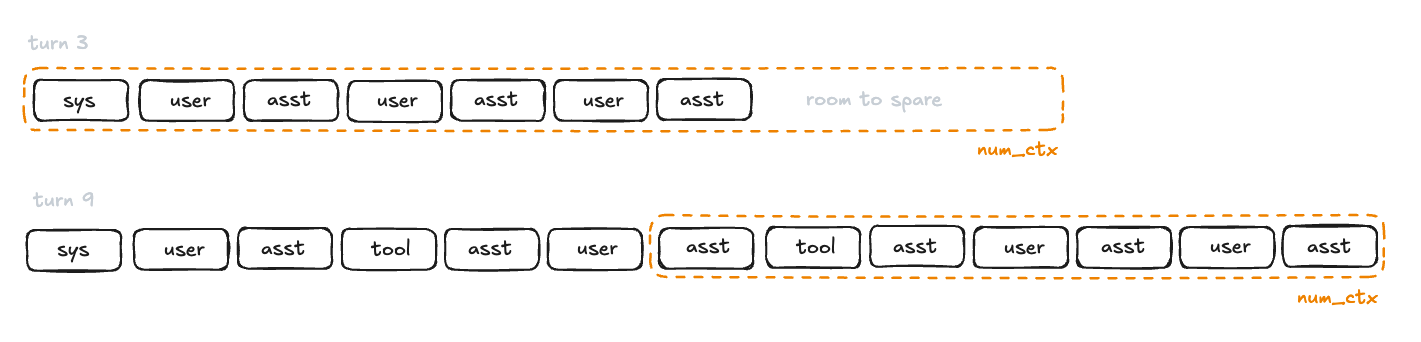 No errors or warnings, the oldest tokens simply stop being read
As you can see, the context window is a fixed frame but the list of tokens keeps growing. By turn 9 the six oldest messages, the system prompt among them, lie outside of the frame. If the agent ignores the size of this frame, early tokens will be lost and the model will forget parts of the conversation. When that happens, the model will not receive part of the input and will start responding without taking it into account. And the worst part is that the very first message is the system prompt which will now be gone and the model will act without it. Nothing good can come out of this.
So how do agents solve this problem?
Compaction.
In simple terms, compaction is a process of summarizing and rebuilding the conversation so far, as to shrink the size of the message array. However, this process must follow a strict rule: after compaction the array must carry exactly three things: a fresh system prompt, one message carrying the summary, and a tail of recent messages copied verbatim.
The Summarizer
To create the summary of the conversation we cannot just blindly call our chat function.
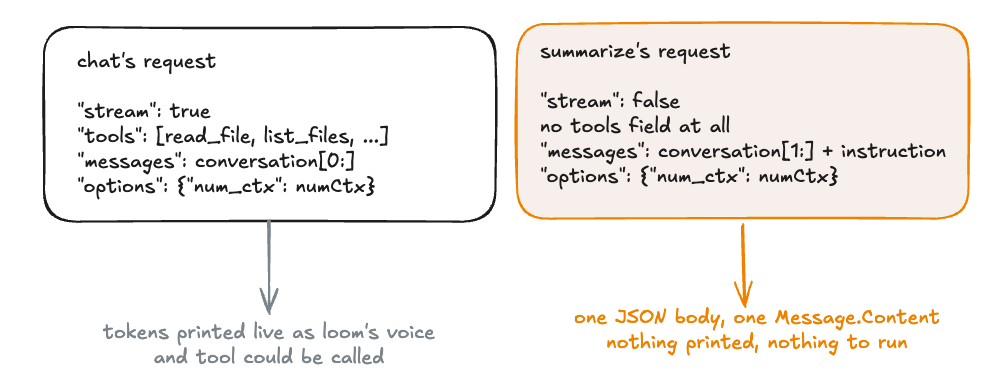 reuse chat and you would watch the summary print as if loom were talking to you
chat streams to the terminal its thinking and its responses, it advertises tools, and it presents the system prompt as the very first message. None of this is what we want.
The summary function must send all of the messages except the system prompt and the instruction on how to perform summary. Think about how the instruction for summarization should look. The instruction must capture the user’s goals and decisions made. Tool calling also needs to be also summarized in a specific way. It should include the files touched and how they changed. The results of the tool execution still matter. Any unfinished work should also be included in the summary.
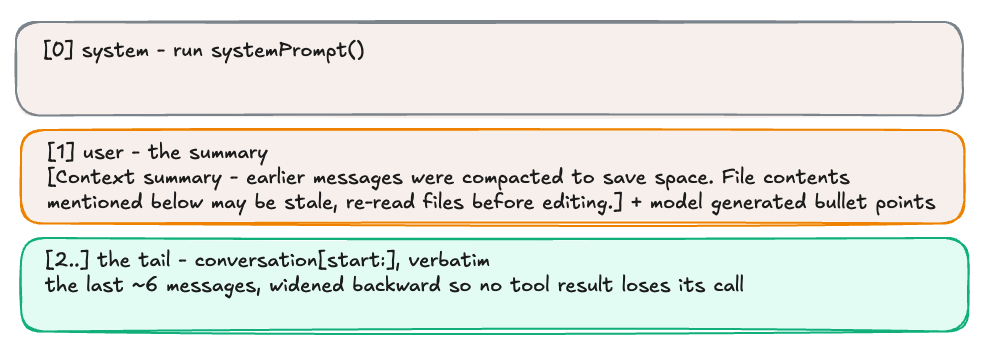 what the model reads first after a compaction: who it is, what happened, what was just said
Slot 0 is systemPrompt() called again rather than old system message copied. This is done to refresh time and anything else that could’ve changed. Slot 1 carries the summary as the user role, wrapped in a bracketed sentence: [Context summary - earlier messages were compacted to save space. File contents mentioned below may be stale, re-read files before editing.]. Slot 2 onward is the tail. Where the tail begins is the first thing we need to figure out.
The Tail
Should the tail be the last six messages? Well, maybe… Suppose the tail is the last six messages and the sixth from last happens to be a tool result. Then the tail begins with an answer whose question, submitted as an assistant message carrying tool_calls, has just been summarized away. We cannot split these two and end up with the result without the call. This would be confusing to the model.
Here is what we need to do:
- Decide how many messages to keep. Call it
keep. Six messages are a good default. - Cut:
start = len(conversation) - keep. If that is less than 1, make it 1, so conversation shorter than the tail keeps everything after the system prompt. - Walk back: while
start > 1andconversation[start]is atoolrole message, subtract one. Every run of tool results is preceded by the assistant message that asked for them, so this stops on that message and the pair is included together. - Rebuild: a fresh system prompt, then the summary, then
conversation[start:].
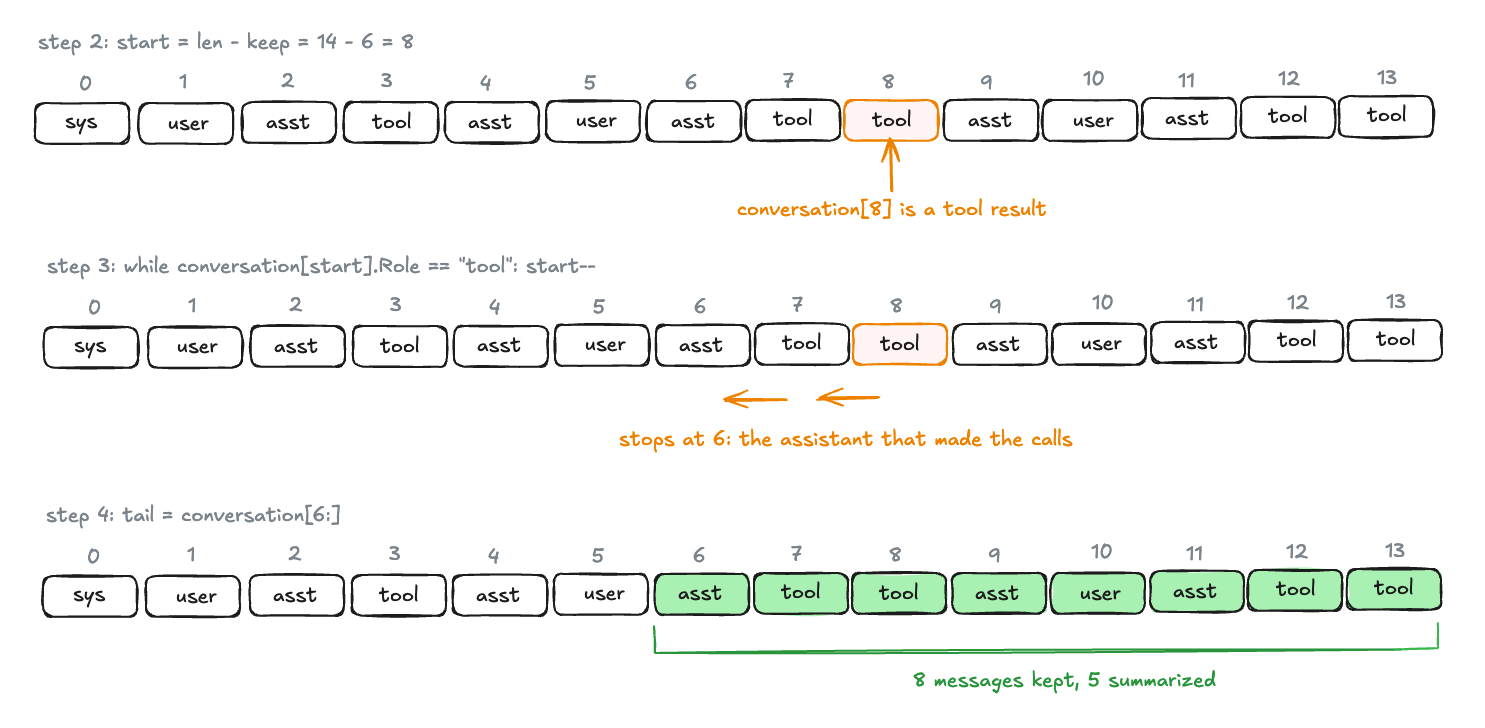 The naive cut at 8 lands on a tool result. Walking back over the two tool messages stops at 6, the assistant message that asked for them, and the tail grows from six to eight messages.
Two things to notice. First, the walk back can only make the tail bigger: it moves the cut toward the beginning of the array and never toward the end. Second, it always terminates on the start > 1 which guards against consuming the system prompt.
The Trigger
We know how to rebuild the messages and now we must take a look when to do it:
- Fix the threshold: `compactAt = numCtx * 8 / 10. We start at the 80% line.
- After every successful
chatcall, remember the count:lastUsed = used, and print the meter from here now thatchatno longer does. - When the inner tool loop has ended, and only then, test
lastUsed > compactAt. If it holds: print a status line with the message count and the numbers. Callsummarize. On success replace the array withcompact(conversation, summary)and setlastUsedto 0, since the new array’s size is unknown until the next call measures it. On failure print a warning and carry on uncompacted.
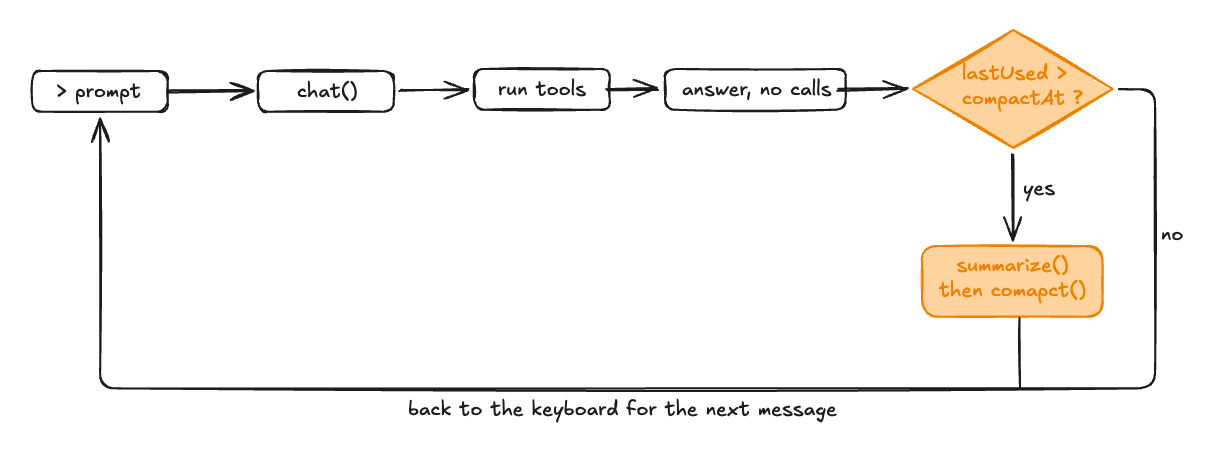 the check runs once per keyboard message, after every tool call has its result
Why after the inner loop and never inside it? Inside, tool calls are in flight and the array may end with results the model has not yet read. The next thing that must happen is a chat call that reads them. Rewriting the array between the call and its results is exactly what we are trying to prevent.
Your Turn
Try to build it yourself. This list captures all the things we talked about in one place:
chat(ctx, messages) (Message, int, error). Theintisprompt_eval_count + eval_countfrom the final chunk and the meter print moves tomain.const compactAt = numCtx * 8 / 10.summarize(ctx, messages) (string, error)is a new function hand-built just for the function of sending a summarize request withStream: false, no tools, and the samenum_ctx. Messages are the conversation array minus element 0 plus the instructions on how to summarize. Usejson.Decodeand returnMessage.Content.compact(conversation []Message, summary string) []Messageis a new function that callssystemPrompt()to get a fresh system prompt, puts summarized conversation into a message as auserrole, then creates tail messages with the walk-back approach we discussed earlier.- The trigger is in
main’s outer loop, after the inner loop ends: print a status line, summarize, compact, setlastUsed = 0. On a summarize error, print a warning and continue.
When you’re ready to validate your implementation or need help, here is an in-depth explanation of the changes.
Add compactAt as constant right after numCtx:
.
.
.
	numCtx    = 4096
	compactAt = numCtx * 8 / 10
)
.
.
.
The signature of chat changes to return used which is declared in the beginning with var used int and then returned in every return:
func chat(ctx context.Context, messages []Message) (Message, int, error) {
And the meter print is now replaced with used in the chunk.Done if block:
if chunk.Done {
    used = chunk.PromptEvalCount + chunk.EvalCount
    break
}
Move the meter print into the main function starting with replacing the old reply, err := chat(...):
reply, used, err := chat(ctx, conversation)
stop()
if err != nil {
	if ctx.Err() != nil {
		fmt.Println("\n(interrupted)")
		if reply.Content != "" {
			reply.ToolCalls = nil
			conversation = append(conversation, reply)
		}
		break
	}
	fmt.Fprintln(os.Stderr, "error:", err)
	break
}
conversation = append(conversation, reply)
lastUsed = used
marker := ""
if used > compactAt {
	marker = " ⚠ context nearly full"
}
fmt.Printf("\n  [ctx %d/%d%s]\n", used, numCtx, marker)
Next is the summarize function:
func summarize(ctx context.Context, messages []Message) (string, error) {
	instruction := Message{Role: "user", Content: "Summarize this conversation " +
		"for your own future reference. Preserve: the user's goals, decisions made, " +
		"file paths touched and how they changed, tool results that still matter, " +
		"and unfinished work. Dense bullet points. Omit pleasantries and dead ends."}

	msgs := append(append([]Message{}, messages[1:]...), instruction)

	body, err := json.Marshal(chatRequest{
		Model:    model,
		Messages: msgs,
		Stream:   false,
		Options:  map[string]any{"num_ctx": numCtx},
	})
	if err != nil {
		return "", err
	}

	req, err := http.NewRequestWithContext(ctx, "POST", ollamaURL, bytes.NewReader(body))
	if err != nil {
		return "", err
	}
	req.Header.Set("Content-Type", "application/json")

	resp, err := http.DefaultClient.Do(req)
	if err != nil {
		return "", err
	}
	defer resp.Body.Close()
	if resp.StatusCode != http.StatusOK {
		return "", fmt.Errorf("summarize failed with status: %s", resp.Status)
	}

	var res chatResponse
	if err := json.NewDecoder(resp.Body).Decode(&res); err != nil {
		return "", err
	}
	return res.Message.Content, nil
}
No surprises here. chatRequest has Stream set to false and there are no tools. Note the append(append([]Message{}, messages[1:]...), instruction). This builds a new slice before appending, so summarize never writes into the real conversation’s array.
The compact function is next:
func compact(conversation []Message, summary string) []Message {
	const keep = 6
	start := len(conversation) - keep
	if start < 1 {
		start = 1
	}
	for start > 1 && conversation[start].Role == "tool" {
		start--
	}
	fresh := []Message{
		{Role: "system", Content: systemPrompt()},
		{Role: "user", Content: "[Context summary — earlier messages were compacted " +
			"to save space. File contents mentioned below may be stale; re-read " +
			"files before editing.]\n\n" + summary},
	}
	return append(fresh, conversation[start:]...)
}
It finds the size of the tail. Then it adds a system prompt, the summary, and the found tail.
The code to trigger compaction goes in the main function, after the inner for loop closes and before the outer loop repeats:
if lastUsed > compactAt {
	fmt.Printf("  [compacting %d messages, ctx %d/%d]\n",
		len(conversation), lastUsed, numCtx)
	summary, err := summarize(context.Background(), conversation)
	if err != nil {
		fmt.Fprintln(os.Stderr, "compaction failed, continuing:", err)
	} else {
		conversation = compact(conversation, summary)
		lastUsed = 0
	}
}
Test It
Run loom and ask it to remember a deploy password:
$ go run ./cmd/loom
loom v0.8 - chatting with gemma4:e4b-mlx (ctrl-c to quit)

you: remember this: the deploy password is periwinkle-7

loom: I have noted that the deploy password is periwinkle-7.
  [ctx 746/4096]

you: read playground/clamp.go and explain what it does in two sentences

  [ctx 711/4096]
  ⚙ read_file(map[path:playground/clamp.go])

loom: The `clamp.go` file defines a function called `Clamp`, which restricts a given integer value (`v`) to a specified range defined by a lower bound (`lo`) and an upper bound (`hi`). If the input value is outside this range, the function returns the nearest boundary; otherwise, it returns the original value.
  [ctx 912/4096]

you read notes/tools.go and list every tool it defines, one line each

  [ctx 906/4096]
  ⚙ read_file(map[path:notes/tools.go])

loom: The tools defined in `notes/tools.go` are:
read_file
list_files
bash
edit_file
  [ctx 2620/4096]

you: read playground/sign.go and playground/sign_test.go and say whether the test covers zero

  [ctx 2615/4096]
  ⚙ read_file(map[path:playground/sign.go])

  [ctx 2677/4096]
  ⚙ read_file(map[path:playground/sign_test.go])

loom: Yes, the test covers zero. In `playground/sign_test.go`, there is a test case `{0, 0}` which specifically checks the input value zero.
  [ctx 2926/4096]

you: read notes/chat.go and say in one sentence what it sends to Ollama

  [ctx 2901/4096]
  ⚙ read_file(map[path:notes/chat.go])

loom: The `chat` function sends a JSON payload to Ollama which contains the specified model, the list of conversation messages, the available tools, and contextual options.
  [ctx 3470/4096 ⚠ context nearly full]
  [compacting 21 messages, ctx 3470/4096]
  [summary printed here — see below]

you: what's the deploy password?

loom: The deploy password is `periwinkle-7`.
  [ctx 1680/4096]
The password goes in the first message, the window fills and compaction fires. Then you ask the question. Whether periwinkle-7 survives the compaction is entirely up to the model.
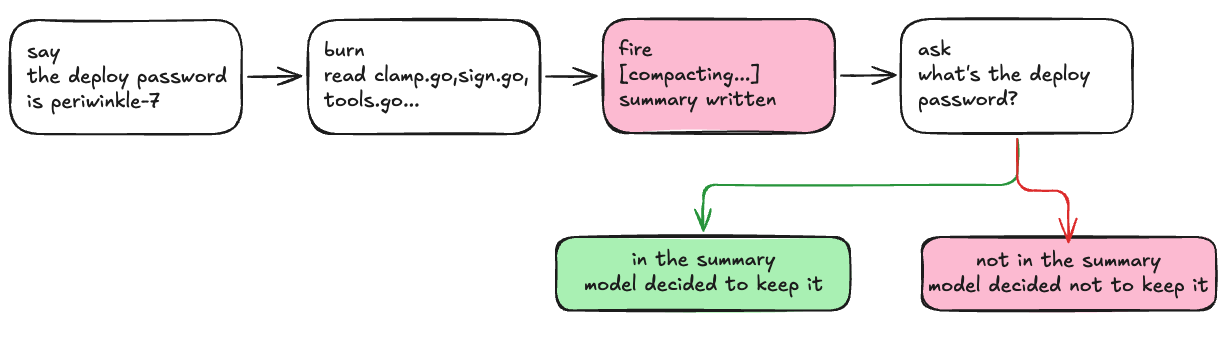 a summary is the summarizer’s opinion of what mattered
You can add a temporary fmt.Println(summary) to see what the model decided to keep. If gemma4:e4b-mlx keeps dropping the password, switch to qwen3.6:27b-mlx and re-run and compare the differences in summaries for these two models.
What’s Next
loom can automatically trigger compaction, but what if I want to do that earlier to make more room for further conversation? In the next lesson we’ll work on adding slash commands and enable the user to manually trigger compaction and other useful tools like clear and context.
Code
You can find full code on GitHub.