After working with AI for a while, I find that the parts of AI I am most excited about aren’t the ones that many people are talking about. There’s a lot of talk about agent harnesses, frameworks, platforms, and other exciting new innovation but all of that is usually focused on how AI can do things for me or instead of me. But I like to understand how things work. Not having to deal with mundane things is a good application for AI but using AI just to get things done faster without understanding the problem domain isn’t very fulfilling or helpful in the long term. Yes, AI can help to get things done fast but is it really helping me, or producing the best quality? As the recently released No AI Slop Manifesto says: “Understanding over speed, Our own thinking over model’s first draft.” And this captures exactly what I like the most, understanding the problem and then the steps to solve that problem. In general, first principles learning.
This is why my AI workflow changed. AI became more of a tool for research, prototyping and a way to educate myself rather than just a tool for writing code. Instead of jumping into implementation, I interrogate the domain, explore use cases, and study the problem. For me, AI isn’t about skipping the thinking but rather it’s about leveling up my own understanding.
But wait, there is more! Not only can AI help me to learn by finding good sources of information, organizing the knowledge or building the lessons, it can also customize the lessons to the exact ways I like to learn. For example, I am a visual learner so I like when the presenter has useful diagrams so I can quickly intake the whole concept and then read or listen to the explanation of these concepts. With AI I can create skills that are customized to how I learn best. A long time ago, I also realized that learning by having fun is extremely powerful technique. When I was in college I had to take a biology elective course. I was really dreading taking this course but the professor taught the class by having us create a cure for diabetes. No, of course we didn’t create the cure nor was there ever an expectation to do so but the process of role playing the researcher made learning interesting and retaining knowledge easy. I did the same with AI. I created a professor skill that takes not only the topic I want to learn but also how I want to learn it and what project I would like to use as a vehicle of the learning. For example, can I learn event sourcing by building an adventure game?
I think this pattern of using AI to customize things to our preferences shows up in many places other than learning. For example, recently there was a lot of talk about someone creating an Adobe clone. The focus was on being able to just clone the solution but I think the reality is that most of the time there is no need to clone the general purpose solution but rather just the parts that one needs and make them work in exactly the way one needs them to work.
The cloning thing probably opens a bunch of questions in areas this article isn’t about, however, I mention this because when faced with the option of buying a product or even using open source solution, I find myself thinking very differently than before AI. Instead of buying something and using it as a black box I’d rather learn about it and then build it myself so that I can improve my skills. This obviously isn’t practical for every situation, you wouldn’t want to rewrite cryptographic libraries.
I don’t want this article to be just theoretical ramblings so I want to show you some simple examples of how this looks in practice for me.
Customizing
I’ve been using Matt Pocock’s skills for some time now and if you haven’t heard of them I strongly recommend you check them out. I learnt a lot from both the skills and Matt’s numerous videos (so thank you Matt!). Some of the greatest parts of these skills are grilling sessions, story writing, PRs, and teaching skills like teach and wayfinder. However, being a visual person I realized that I would benefit from these skills a lot more if I customized them to include visualizations like sequence and flow diagrams to explain the story or changes in PR or document design with C4 model like diagrams.
This plan to add visualization started as small changes but eventually turned into a full blown skill repo of my own robjsliwa/skills built around how my brain actually likes to work. In my skills, diagrams are not just decorations added to the model output. The output itself is organized around the diagrams which then the development story or PR talks about. When grilling ideas the options are presented with diagrams describing each. I also added different modes for coding: full loop, code along and pair programming.
Full Loop is the entire development cycle from the idea to full implementation.
| Step | Run | You get |
|---|---|---|
| 1. Align | /interview |
shared understanding; GLOSSARY.md, CONTEXT.md, ADRs as you go |
| 2. Requirements | /write-requirements |
requirements.md: the what and why, with a context diagram and the user journey |
| 3. Design | /solution-design |
design.md: the how, with C4 container and behaviour diagrams; CLAUDE.md; ADRs |
| 4. Phase | /vertical-slice-phasing |
phases.md: build order, walking skeleton first, with a story map |
| 5. Stories | /elaborate-current-phase |
stories for this phase only, each one a change a person can see |
| 6. Build | /tdd or /code-along |
the code, one story per session; then /review-change and /pr; optionally /test-along to verify it yourself |
| 7. Next phase | /elaborate-current-phase |
the next phase’s stories, re-derived from the real code |
/interview align on invoice reminders
/write-requirements                 → docs/planning/invoice-reminders/requirements.md
/clear
/solution-design docs/planning/invoice-reminders/requirements.md
/clear                              → design.md, CLAUDE.md, docs/adr/0004-*.md
/vertical-slice-phasing docs/planning/invoice-reminders/design.md
/clear                              → phases.md
/elaborate-current-phase docs/planning/invoice-reminders/phases.md
/clear                              → stories/01-01-owner-sees-overdue-invoices.md, ...
/tdd docs/planning/invoice-reminders/stories/01-01-owner-sees-overdue-invoices.md
/clear                              # one story per session; repeat until the phase is done
/elaborate-current-phase ...        # then the next phase, against the code you now have
Code Along is the mode where you have a design and a story but you want to code and learn. You get to actually code and then agent debriefs on how well you did and you can have a discussion about what could be done better or differently.
Pairing is the pair programming mode. You and your agent code and then either you accept the changes or discuss and make changes.
Learning, Building, and Having Fun
To show how this looks in practice, let’s walk through a simple project: PocketDM, a solo tabletop like RPG game. Anyone who tried playing D&D with a chatbot knows that LLMs cannot keep track of things and will eventually get confused and make up stuff. We are going to use this as a fun way to learn how to build a deterministic game engine that keeps the LLM at the edge and also learn about event sourcing. Let’s look at how these skills take this idea, through system design and development stories.
Clearing the Fog Visually
Rather than starting with a vague idea of what we want to build and trying to learn along the way, we’ll let AI help us research and interview us to come up with the detailed plan. To do this we’ll use the trailblazer skill:
/trailblazer I want to build PocketDM, a solo tabletop RPG web app in Go,
HTMX, and SQLite to practice event-sourced state machines and strict
deterministic-vs-AI boundaries. When I play RPGs in a normal chat window,
the LLM cheats on dice rolls, forgets inventory, and makes up rules.
I want Go to own the rules, dice, and state, and the LLM to only narrate,
but I don't know which open-licensed RPG ruleset fits solo play best,
whether players should type freeform actions or pick moves.
This skill creates a research graph and hosts it on a simple, local web server to show the view of our entire research plan.
Even from the get go this skill will converse using text and diagrams to visualize the concepts:
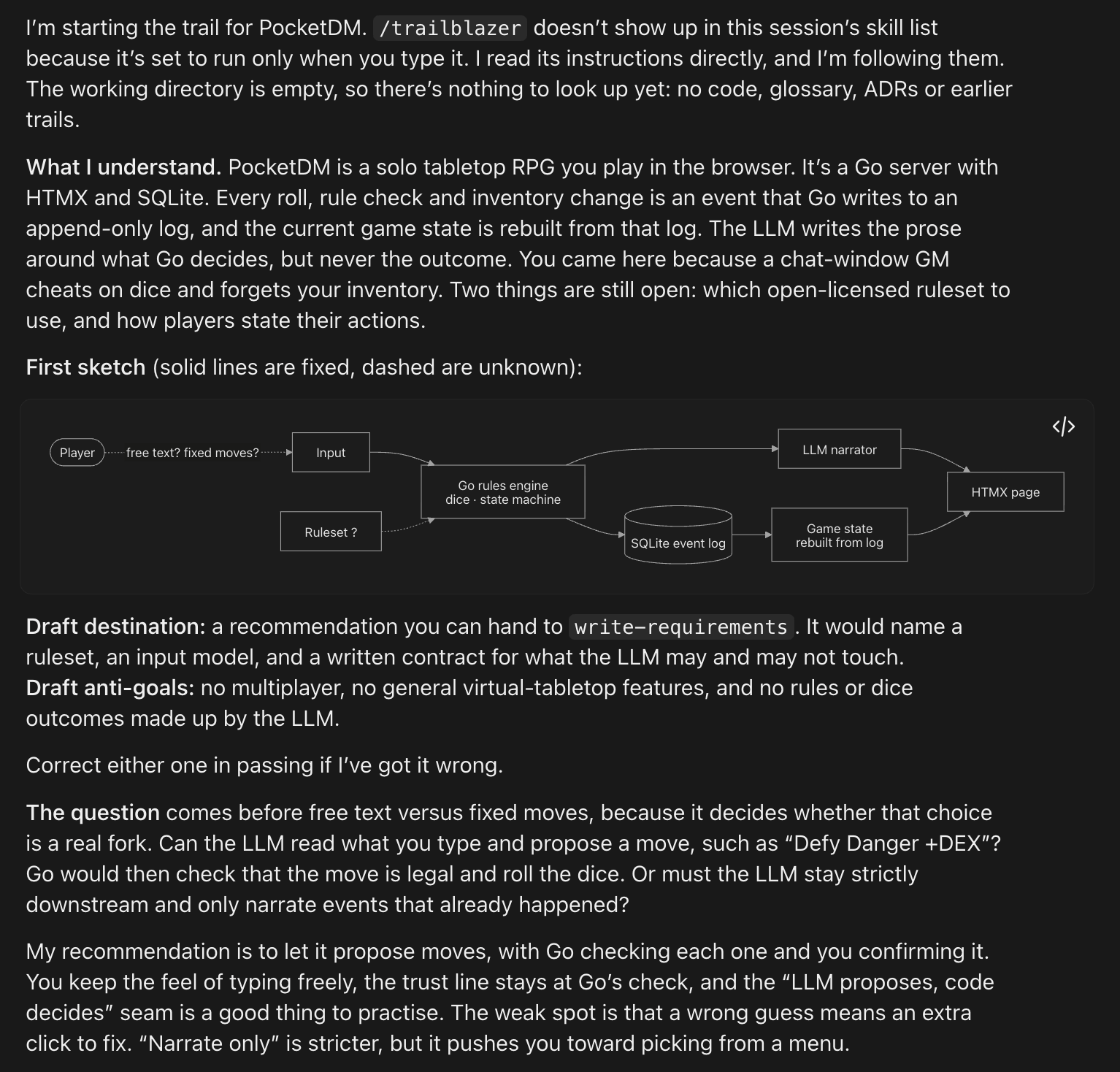
Once the skill finishes the initial interview, it creates the research map and opens the browser to show it to you. Each node is marked as research, talk, task, or spike, and so on. Research nodes run on their own in subagents and when done their results are brought back into the graph and potentially additional conversations. Meanwhile, you can chat with talk nodes as shown below:
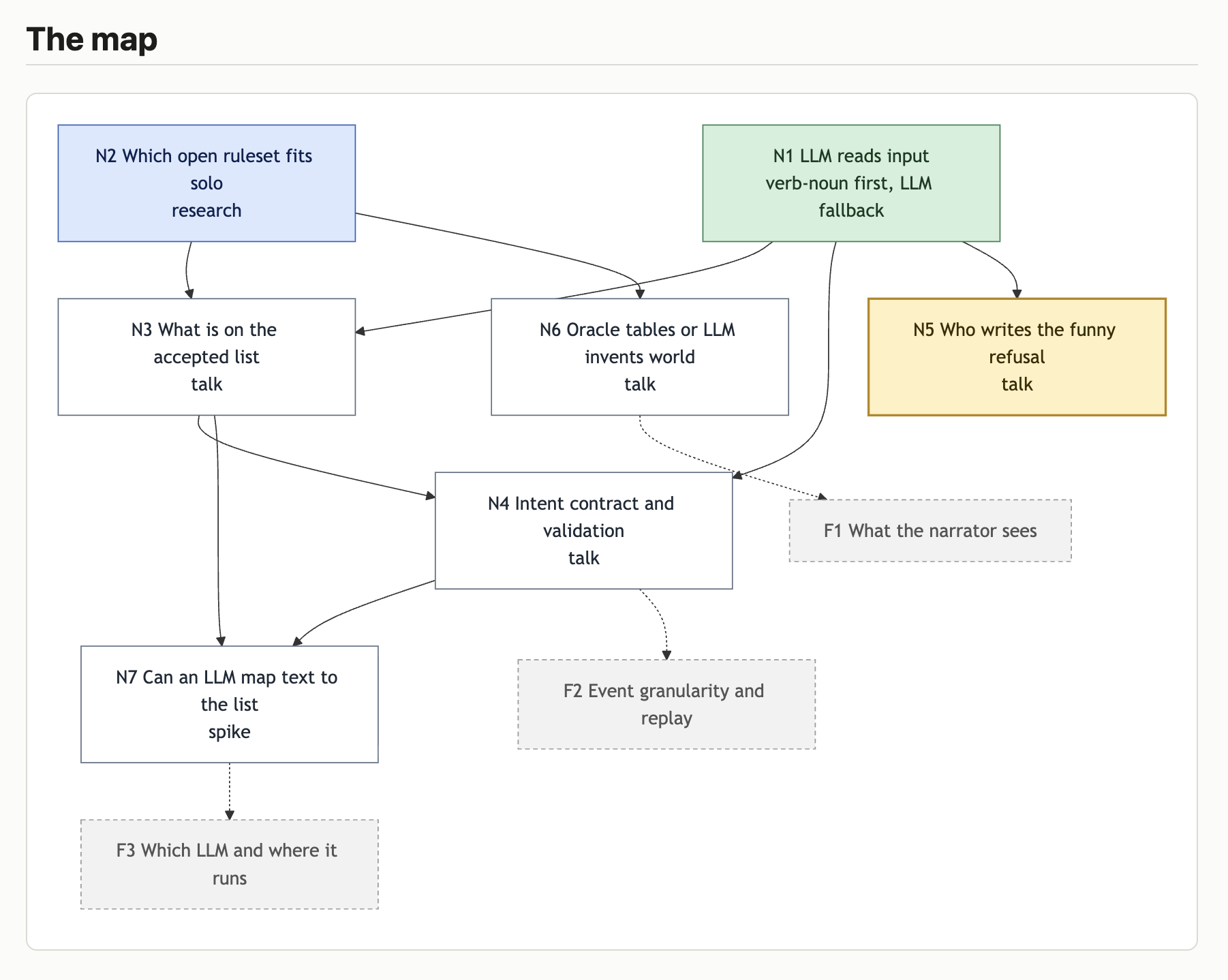
As you can see each node is color coded:
- 🟢 Green (
decided): - Node completed. - 🔵 Blue (
researching): - Background agent researching a topic. - 🟣 Purple (
probing): - A timeboxedspike. - 🟡 Yellow (
active): - The currenttalkdecision you and the agent are discussing right now. - ⚪ Grey dashed (
fog): - Vague ideas like “Which LLM and where it runs” that aren’t sharp enough to be questions yet.
You can also click on the node that you are discussing with the agent (yellow) and see the options proposed by the agent:
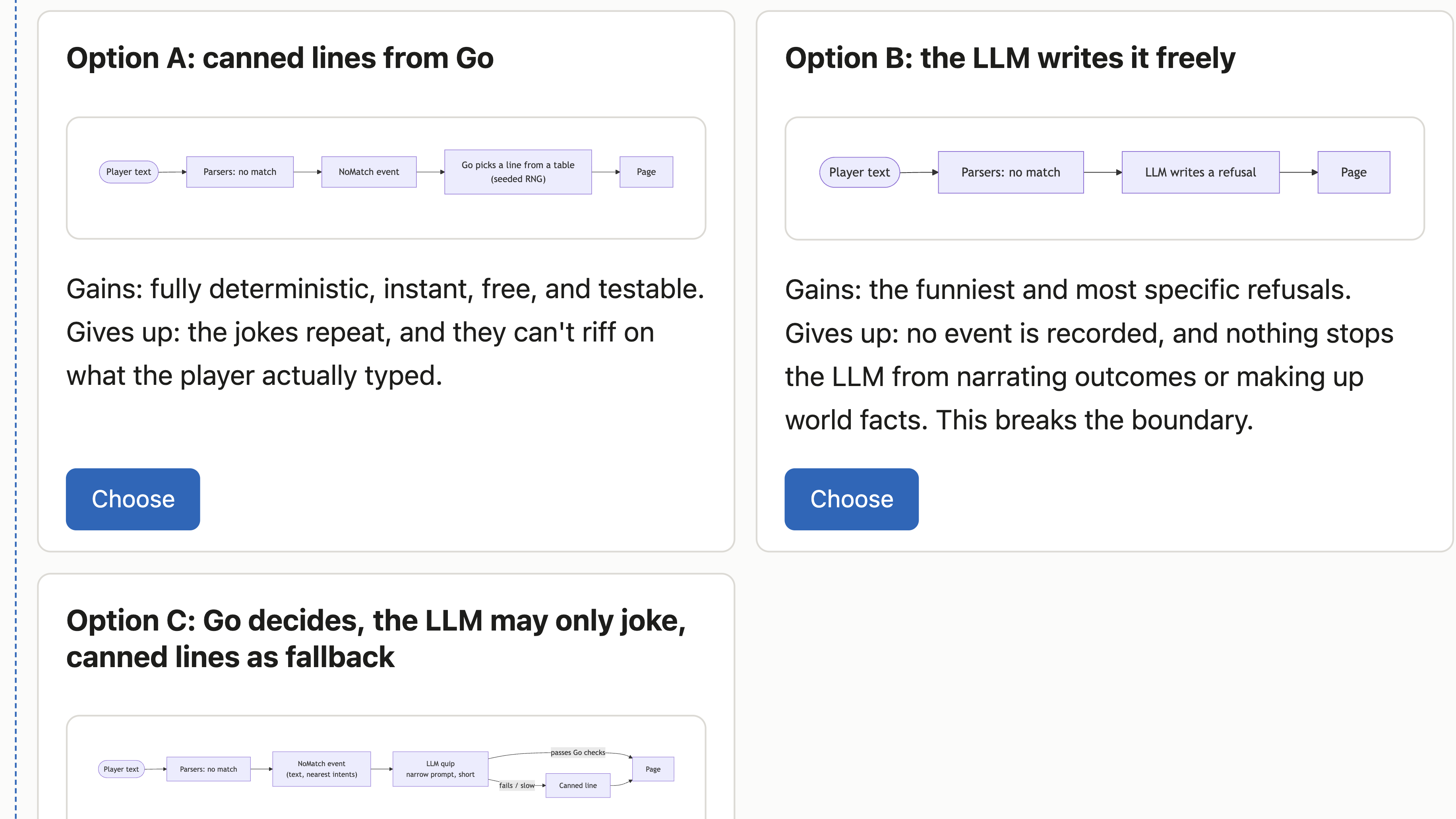
Notice that the research tree is not static and new nodes can be created as a result of conversation or research.
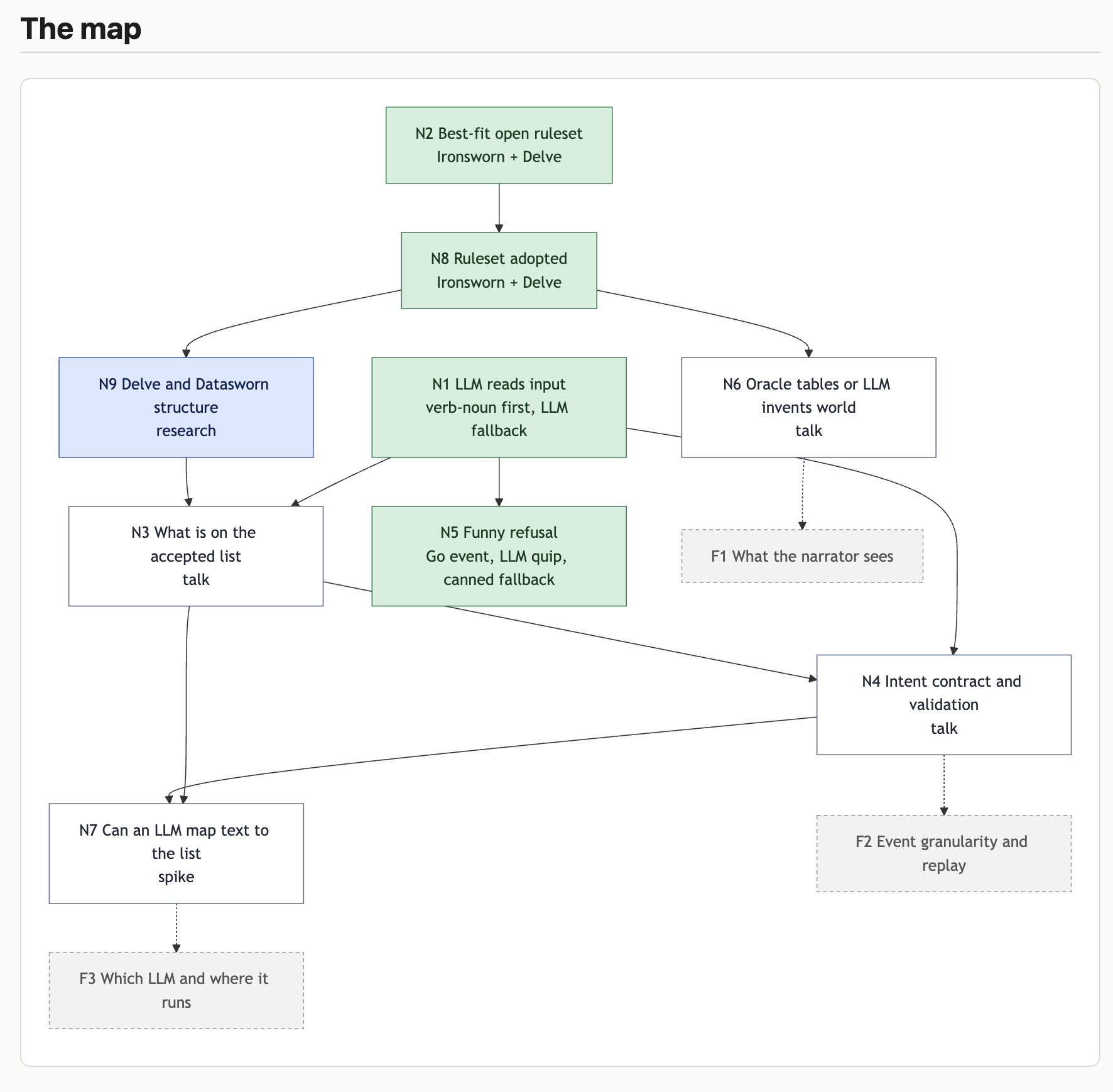
Once the trailblazer skill finishes creating report.md, we can use it as input to write-requirements skill: /write-requirements docs/research/pocketdm/report.md. This produces docs/research/pocketdm/requirements.md that can be passed to the /solution-design docs/research/pocketdm/requirements.md which will create very a detailed design.md.
The design document starts with a description and then it is divided into multiple sections with C4 model like diagrams:
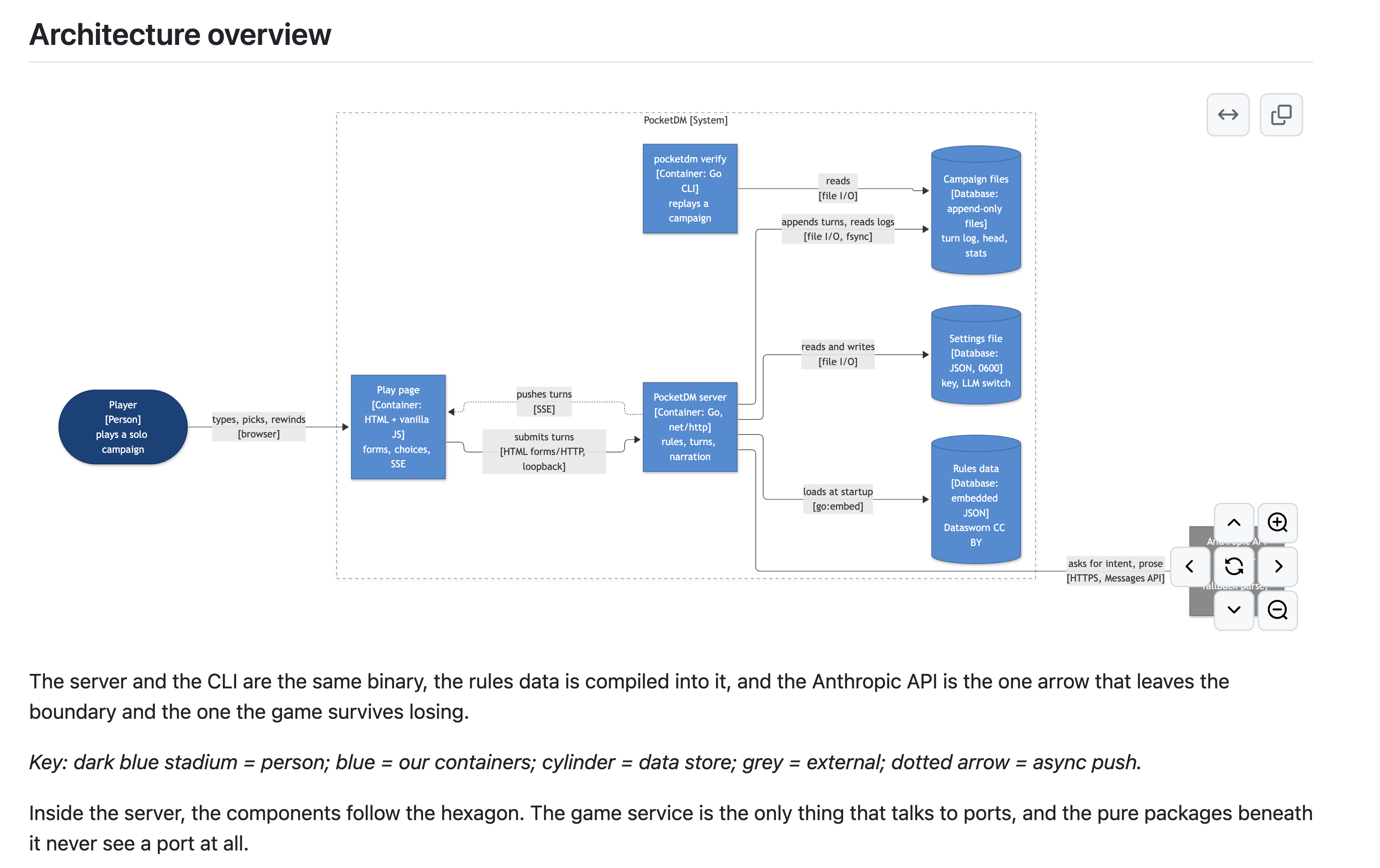
And it drills further into details, always supporting with visualization, in this case of data and persistence:
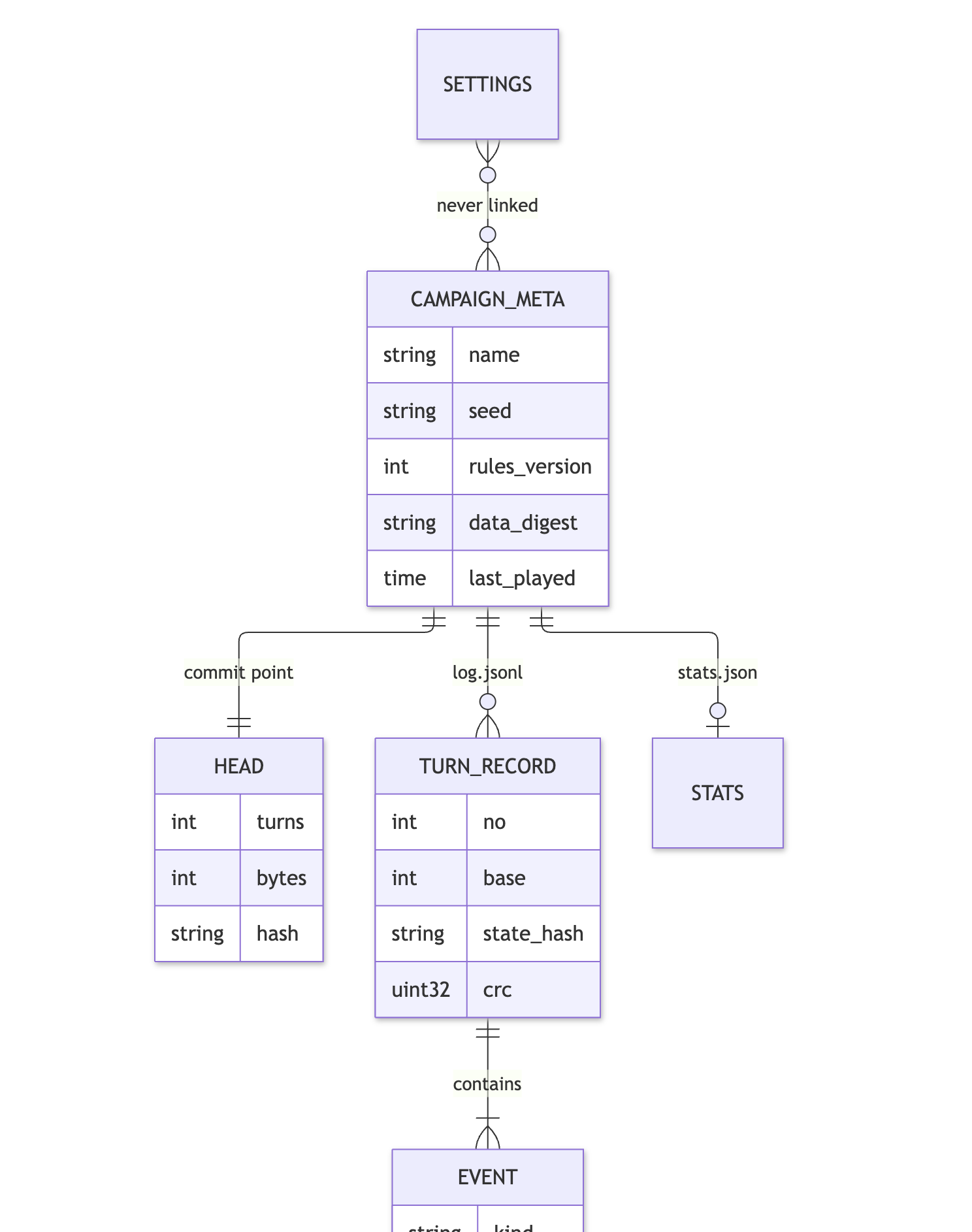
From here, the rest of the loop falls naturally into place. Passing design.md into /vertical-slice-phasing generates a phase based plan starting with a walking skeleton, and /elaborate-current-phase breaks that down into small stories.
When it is finally time to write the code, I also gave myself the choice to use the tdd skill and have AI code for me, or to use /code-along mode in which case I write the code myself, and the agent acts as a mentor reviewing my work. Or I can use AI for pair programming with /pair skills.
Wrapping Up
Most of the conversation around AI right now is about taking yourself out of the loop so you can ship faster. And sure, there is a time and place for that.
But for me, the real magic happens when I use AI to learn and improve my knowledge. By customizing my agent skills around how I like to learn with visuals, interactive research graphs, and different coding modes, AI is no longer just for writing the code for me. Instead, it becomes a custom tailored learning environment that helps me tackle ambitious ideas, understand complex domains from first principles, and have a lot of fun along the way.
I hope you enjoyed this article and that it gave you a different perspective on how AI can be used. If you want to check out my skills, they are all available on GitHub.