I was recently looking for the best way to build agents. There is no shortage of SDKs and frameworks, and a lot of them are very good, but I kept wishing for something simpler. I thought, wouldn’t it be great if you could build an agent the way you build routes in Next.js, by dropping files into a folder and letting the structure be the configuration? A file becomes a route. Why couldn’t a file become a tool, or an agent, or a skill?
Guess what. I ran straight into exactly that: eve, the new open source agent framework from Vercel. An agent is a folder. So I did what any reasonable person would do with a new toy. I built a game in order to learn how eve works.
In this article I want to share how I built a text adventure game that you can play through Slack using eve. The game will be a Dungeon Master agent that narrates and runs the world. The characters you meet are their own small agents. And underneath it all sits a deterministic world model. I want the story to be grounded in a real map with real rules so that the agent would have guardrails and not make up things as the story progresses. When done, you will learn most of the eve’s features like how to build agent that can call tools, skills, subagents, and communicate via dev and Slack channels.
A note before we start. eve is in public beta as of June 2026, so some things may change in the future.
The Folder is the Agent
You scaffold a project in one command.
npm eve@latest init eve-adventure
This installs dependencies, initializes Git, and drops you into a dev TUI where you can talk to your agent. During the initialization eve will ask you to select a model and specify the provider. You can use either Vercel or point to your own provider directly. eve also requires vercel CLI to be installed and if you don’t have it will let you automatically install it. When initialization is done you should see a folder structure that looks like this:
.
├── agent
│   ├── agent.ts
│   ├── channels
│   │   └── eve.ts
│   ├── instructions.md
├── AGENTS.md
├── CLAUDE.md
├── package-lock.json
├── package.json
└── tsconfig.json
The smallest agent eve will run is a single instructions.md. If you want to pick a model or tune the runtime, you add agent.ts.
import { defineAgent } from "eve";

export default defineAgent({
  model: "anthropic/claude-sonnet-4.6",
});
For our game, the DM’s identity is just text in instructions.md:
# Identity

You are the narrator and Dungeon Master of a text adventure, wry and atmospheric.

The world tools are the only source of truth about places, items, doors, and who is
present. Call look to see the room, its exits, its items, and which characters are
here. move, take, unlock, use, and npc_give change the world; narrate only what they
return, and never route around a refusal.

You do not voice characters yourself. You have no authority to speak for the hermit
or any other character, and you never invent their dialogue. When the player greets,
asks, questions, or otherwise speaks to a character that look reports is present, you
must delegate to that character's agent and pass along exactly what the player said.
Narrate using only the line that character returns. If you have not delegated, you
must not produce any character speech.

A character may offer an item in its structured reply. When it does, call npc_give
with that character and item to hand it over, then narrate the character's line
together with whatever npc_give returns. If npc_give refuses, the character cannot
give that item, so narrate accordingly. Never deliver an item to the player except
through npc_give.

Keep your own narration to two or three sentences.
Grounding the Game World
To keep the DM agent from making stuff up, I wanted a real map of our adventure game which defines locations, items, doors, passages, and NPCs. Given the world definition, the current state, and user input, the engine returns new state plus a ground truth fact string for the agent narrator to dress up with prose. Illegal actions like trying to go to the location that doesn’t exist or pick up an object that is not there are refused by the function, not by the model.
A definition of the world like this could be written in YAML and loaded into the game but to keep things simple, we are going to just hardcode them for now.
For eve, folder names mean things:
| Directory | Description |
|---|---|
connections/ |
Tools from external MCP servers |
hooks/ |
Code that reacts to lifecycle and stream events |
sandbox/ |
A controlled workspace for files and commands |
subagents/ |
Specialist agents the root agent can delegate to |
schedules/ |
Recurring or scheduled work |
lib/ |
Shared code imported by the other agent files |
You can read more about it here.
Since the game engine, definitions and helper functions are just generic code it will go into lib/world. If you were to put world/ directly in the root folder, eve would start printing warnings about the unknown folder.
Create lib/world/types.ts:
export type Direction = "north" | "south" | "east" | "west" | "up" | "down";

export interface Room {
  id: string;
  name: string;
  description: string;
  exits: Partial<Record<Direction, string>>;
}

export interface Item {
  id: string;
  name: string;
  location: string | "inventory";
  portable: boolean;
}

export interface Door {
  id: string;
  from: string;
  to: string;
  locked: boolean;
  key?: string; // item id needed to unlock
}

export interface Npc {
  id: string;
  name: string;
  location: string; // room id
  holds: string[]; // item ids this character can hand over
}

export interface World {
  start: string;
  rooms: Record<string, Room>;
  items: Record<string, Item>;
  doors: Door[];
  npcs: Record<string, Npc>;
  flags: Record<string, boolean>;
}

export interface GameState {
  location: string;
  inventory: string[];
  itemLocations: Record<string, string>;
  doors: Record<string, { locked: boolean }>;
  npcHolds: Record<string, string[]>;
  flags: Record<string, boolean>;
}

export interface VerbResult {
  ok: boolean;
  facts: string; // ground truth for the narrator to dress up
  state: GameState; // unchanged when ok is false
}
The map itself is one small clearing, a cottage, and a cellar behind a locked trapdoor. A hermit waits in the clearing holding the only key.
Create lib/world/definition.ts:
import type { World } from "./types.js";

export const world: World = {
  start: "clearing",
  rooms: {
    clearing: {
      id: "clearing",
      name: "A Mossy Clearing",
      description:
        "Birch trees lean over a ring of damp stones. A cottage sits to the east.",
      exits: { east: "cottage" },
    },
    cottage: {
      id: "cottage",
      name: "The Abandoned Cottage",
      description:
        "Dust, a cold hearth, and a trapdoor set into the floorboards.",
      exits: { west: "clearing", down: "cellar" },
    },
    cellar: {
      id: "cellar",
      name: "The Cellar",
      description: "Earthen walls and the smell of old coins.",
      exits: { up: "cottage" },
    },
  },
  items: {
    potion: {
      id: "potion",
      name: "unlabeled potion",
      location: "cottage",
      portable: true,
    },
    hoard: {
      id: "hoard",
      name: "small hoard of coins",
      location: "cellar",
      portable: true,
    },
    rusty_key: {
      id: "rusty_key",
      name: "rusty key",
      location: "hermit",
      portable: true,
    },
  },
  doors: [
    {
      id: "trapdoor",
      from: "cottage",
      to: "cellar",
      locked: true,
      key: "rusty_key",
    },
  ],
  npcs: {
    hermit: {
      id: "hermit",
      name: "the hermit",
      location: "clearing",
      holds: ["rusty_key"],
    },
  },
  flags: { potion_drunk: false },
};
Our agent doesn’t generate location descriptions from its context window. Instead it will call tools to get information about the location and the tool will return a canonical description of the location, items at that location, and NPCs. The agent will take that information and generate atmospheric and creative description based on that, keeping the flow of the story.
Similarly, the engine accepts very simple commands that follow verb noun pattern. The agent will take any user input and attempt to translate into an intent that matches verb command or answer in some creative way if the intent doesn’t match.
All of the state and tooling for this lives in lib/world/engine.ts:
import type { World, GameState, VerbResult, Direction } from "./types.js";

export function initialState(world: World): GameState {
  const itemLocations: Record<string, string> = {};
  for (const item of Object.values(world.items))
    itemLocations[item.id] = item.location;
  const doors: Record<string, { locked: boolean }> = {};
  for (const d of world.doors) doors[d.id] = { locked: d.locked };
  const npcHolds: Record<string, string[]> = {};
  for (const n of Object.values(world.npcs)) npcHolds[n.id] = [...n.holds];
  return {
    location: world.start,
    inventory: [],
    itemLocations,
    doors,
    npcHolds,
    flags: { ...world.flags },
  };
}

function normalize(s: string): string {
  return s
    .toLowerCase()
    .replace(/[\s_-]+/g, " ")
    .trim();
}

export function resolveItemId(world: World, query: string): string | null {
  const q = normalize(query);
  for (const item of Object.values(world.items)) {
    if (normalize(item.id) === q || normalize(item.name) === q) return item.id;
  }
  return null;
}

export function look(world: World, s: GameState): VerbResult {
  const room = world.rooms[s.location];
  const items = Object.values(world.items)
    .filter((i) => s.itemLocations[i.id] === s.location)
    .map((i) => i.name);
  const characters = Object.values(world.npcs)
    .filter((n) => n.location === s.location)
    .map((n) => n.name);
  const facts =
    `room: ${room.name}\n` +
    `look: ${room.description}\n` +
    `exits: ${Object.keys(room.exits).join(", ") || "none"}\n` +
    `items here: ${items.join(", ") || "none"}\n` +
    `characters here: ${characters.join(", ") || "none"}`;
  return { ok: true, facts, state: s };
}

export function move(world: World, s: GameState, dir: Direction): VerbResult {
  const dest = world.rooms[s.location].exits[dir];
  if (!dest) return { ok: false, facts: `there is no exit ${dir}`, state: s };
  const door = world.doors.find(
    (d) =>
      (d.from === s.location && d.to === dest) ||
      (d.from === dest && d.to === s.location)
  );
  if (door && s.doors[door.id].locked) {
    return { ok: false, facts: `the ${door.id} is locked`, state: s };
  }
  return {
    ok: true,
    facts: `moved ${dir} into ${world.rooms[dest].name}`,
    state: { ...s, location: dest },
  };
}

export function take(world: World, s: GameState, itemId: string): VerbResult {
  const item = world.items[itemId];
  if (!item)
    return { ok: false, facts: `there is no ${itemId} here`, state: s };
  if (s.itemLocations[itemId] !== s.location)
    return { ok: false, facts: `the ${item.name} is not here`, state: s };
  if (!item.portable)
    return { ok: false, facts: `the ${item.name} cannot be carried`, state: s };
  return {
    ok: true,
    facts: `took the ${item.name}`,
    state: {
      ...s,
      inventory: [...s.inventory, itemId],
      itemLocations: { ...s.itemLocations, [itemId]: "inventory" },
    },
  };
}

export function unlock(world: World, s: GameState, doorId: string): VerbResult {
  const door = world.doors.find((d) => d.id === doorId);
  if (!door) return { ok: false, facts: `there is no ${doorId}`, state: s };
  if (!s.doors[doorId].locked)
    return { ok: false, facts: `the ${doorId} is already unlocked`, state: s };
  if (door.key && !s.inventory.includes(door.key))
    return {
      ok: false,
      facts: `you need the ${
        world.items[door.key].name
      } to unlock the ${doorId}`,
      state: s,
    };
  return {
    ok: true,
    facts: `unlocked the ${doorId}`,
    state: { ...s, doors: { ...s.doors, [doorId]: { locked: false } } },
  };
}

export function inventory(world: World, s: GameState): VerbResult {
  const names = s.inventory.map((id) => world.items[id].name);
  return {
    ok: true,
    facts: `carrying: ${names.join(", ") || "nothing"}`,
    state: s,
  };
}

export function use(world: World, s: GameState, itemId: string): VerbResult {
  if (!s.inventory.includes(itemId))
    return { ok: false, facts: `you are not carrying that`, state: s };
  if (itemId === "potion") {
    return {
      ok: true,
      facts: `drank the potion; a warmth spreads, nothing else happens`,
      state: { ...s, flags: { ...s.flags, potion_drunk: true } },
    };
  }
  return { ok: false, facts: `nothing happens when you use that`, state: s };
}

export function npcGive(
  world: World,
  s: GameState,
  npcId: string,
  itemQuery: string
): VerbResult {
  const npc = world.npcs[npcId];
  if (!npc) return { ok: false, facts: `there is no such character`, state: s };
  if (npc.location !== s.location)
    return { ok: false, facts: `${npc.name} is not here`, state: s };

  const itemId = resolveItemId(world, itemQuery);
  if (!itemId)
    return {
      ok: false,
      facts: `there is no item called ${itemQuery}`,
      state: s,
    };

  const holds = s.npcHolds[npcId] ?? [];
  if (!holds.includes(itemId))
    return {
      ok: false,
      facts: `${npc.name} has nothing like that to give`,
      state: s,
    };

  return {
    ok: true,
    facts: `${npc.name} hands you the ${world.items[itemId].name}`,
    state: {
      ...s,
      inventory: [...s.inventory, itemId],
      itemLocations: { ...s.itemLocations, [itemId]: "inventory" },
      npcHolds: { ...s.npcHolds, [npcId]: holds.filter((i) => i !== itemId) },
    },
  };
}
Two functions to point out are normalize and resolveItemId. When the user types in take potion or pick up unlabeled potion the engine needs to normalize this to the actual item id: "potion".
Finally, create lib/world/store.ts which holds the actual state:
import { defineState } from "eve/context";
import type { GameState } from "./types.js";
import { world } from "./definition.js";
import { initialState } from "./engine.js";

const gameState = defineState("text-adventure.game-state", () => initialState(world));

export const getState = (): GameState => gameState.get();
export const applyState = (next: GameState): void => {
  gameState.update(() => next);
};
export const resetGame = (): void => {
  gameState.update(() => initialState(world));
};
This function is pretty straightforward but there is one very important thing to point out: defineState function. defineState creates a named, durable per-session slot for the game state. Unlike a plain module level variable, it survives eve’s workflow step boundaries: each tool call runs as a separate durable step and re-executes module code fresh, so a plain let state = ... resets on every tool call. defineState persists the value in the workflow’s durable store and restores it when the next step starts. Without this, if the player moved from the clearing to the cottage, the state change would be reset by the workflow and the location would go back to the clearing, while the player would be convinced they are in the cottage.
The DM Agent Tools
Every verb action in the engine is exposed to the agent as a tool and has to be described as such. All tool definitions go into tools/ folder and the filename is the tool name. A tool validates its input with Zod, calls the engine, persists the result, and hands back the fact string. The model picks the tool and narrates.
Create tools/move.ts:
import { defineTool } from "eve/tools";
import { z } from "zod";
import { world } from "../lib/world/definition.js";
import { getState, applyState } from "../lib/world/store.js";
import { move, look } from "../lib/world/engine.js";

export default defineTool({
  description:
    "Move the player one step in a compass direction. The world decides if the move is legal. Narrate only the result.",
  inputSchema: z.object({
    direction: z.enum(["north", "south", "east", "west", "up", "down"]),
  }),
  async execute({ direction }) {
    const result = move(world, getState(), direction);
    if (result.ok) {
      applyState(result.state);
      const lookResult = look(world, result.state);
      return { ok: true, facts: result.facts + "\n" + lookResult.facts };
    }
    return { ok: result.ok, facts: result.facts };
  },
});
The rest of the tools follow exactly the same pattern:
tools/inventory.ts:
import { defineTool } from "eve/tools";
import { z } from "zod";
import { world } from "../lib/world/definition.js";
import { getState } from "../lib/world/store.js";
import { inventory } from "../lib/world/engine.js";

export default defineTool({
  description:
    "List what the player is carrying. Read-only. Narrate only what this returns.",
  inputSchema: z.object({}),
  async execute() {
    const result = inventory(world, getState());
    return { ok: result.ok, facts: result.facts };
  },
});
tools/look.ts:
import { defineTool } from "eve/tools";
import { z } from "zod";
import { world } from "../lib/world/definition.js";
import { getState } from "../lib/world/store.js";
import { look } from "../lib/world/engine.js";

export default defineTool({
  description:
    "Look at the current room: its description, exits, the items present, and which characters are here. Read-only. Narrate only what this returns.",
  inputSchema: z.object({}),
  async execute() {
    const result = look(world, getState());
    return { ok: result.ok, facts: result.facts };
  },
});
tools/npc_give.ts:
import { defineTool } from "eve/tools";
import { z } from "zod";
import { world } from "../lib/world/definition.js";
import { getState, applyState } from "../lib/world/store.js";
import { npcGive } from "../lib/world/engine.js";

export default defineTool({
  description:
    "Hand an item from a present character to the player. The world decides whether the character may give it. Call this after a character offers an item; never deliver an item any other way.",
  inputSchema: z.object({
    npc: z.string().describe("The character's id, for example hermit."),
    item: z.string().describe("The item id the character offered."),
  }),
  async execute({ npc, item }) {
    const result = npcGive(world, getState(), npc, item);
    if (result.ok) applyState(result.state);
    return { ok: result.ok, facts: result.facts };
  },
});
tools/take.ts:
import { defineTool } from "eve/tools";
import { z } from "zod";
import { world } from "../lib/world/definition.js";
import { getState, applyState } from "../lib/world/store.js";
import { take, resolveItemId } from "../lib/world/engine.js";

export default defineTool({
  description:
    "Pick up an item present in the current room. The world decides whether it can be taken. Narrate only the result.",
  inputSchema: z.object({
    item: z.string().describe("The item name or id to pick up, for example 'unlabeled potion' or 'rusty_key'."),
  }),
  async execute({ item }) {
    const itemId = resolveItemId(world, item) ?? item;
    const result = take(world, getState(), itemId);
    if (result.ok) applyState(result.state);
    return { ok: result.ok, facts: result.facts };
  },
});
tools/unlock.ts:
import { defineTool } from "eve/tools";
import { z } from "zod";
import { world } from "../lib/world/definition.js";
import { getState, applyState } from "../lib/world/store.js";
import { unlock } from "../lib/world/engine.js";

export default defineTool({
  description:
    "Unlock a door or trapdoor. The world requires the player to be carrying the right key. Narrate only the result.",
  inputSchema: z.object({
    door: z.string().describe("The door id to unlock, for example trapdoor."),
  }),
  async execute({ door }) {
    const result = unlock(world, getState(), door);
    if (result.ok) applyState(result.state);
    return { ok: result.ok, facts: result.facts };
  },
});
Human in the Loop
Some actions should pause for a human. eve calls that human-in-the-loop, and you can enable it with a single field. We use it in use tool.
In tools/use.ts:
import { defineTool } from "eve/tools";
import { z } from "zod";
import { world } from "../lib/world/definition.js";
import { getState, applyState } from "../lib/world/store.js";
import { use, resolveItemId } from "../lib/world/engine.js";

export default defineTool({
  description:
    "Use or consume an item the player is carrying. Narrate only what this returns.",
  inputSchema: z.object({ item: z.string() }),
  // Irreversible actions wait for a human. In Slack this becomes buttons.
  needsApproval: ({ toolInput }) => {
    const itemId = resolveItemId(world, toolInput?.item ?? "") ?? toolInput?.item ?? "";
    return itemId === "potion";
  },
  async execute({ item }) {
    const itemId = resolveItemId(world, item) ?? item;
    const result = use(world, getState(), itemId);
    if (result.ok) applyState(result.state);
    return { ok: result.ok, facts: result.facts };
  },
});
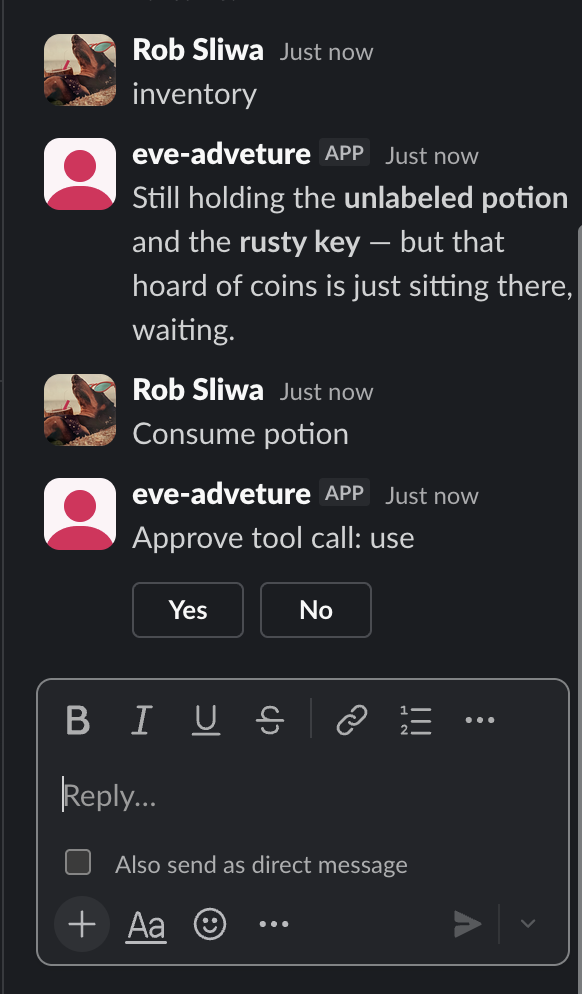
The approval rule is data, keyed off the item id. Drinking an unlabeled potion you found in an abandoned cottage is exactly the kind of decision a player should get to confirm, and we will see eve turn that needsApproval into real Slack buttons without another line of code.
The NPC: Hermit
To give life to NPC we will use another feature eve offers, and that is, subagent. A subagent is the same shape as agent but one level down in folder subagents/, with its own agent.ts and instructions.md. It starts with a clean context window and only the tools you give it, does its job, and hands the result back. The parent calls it like a tool.
Two fields make a character in our game. The description is how the DM agent knows when to delegate. The outputSchema makes the return structured, so the DM gets back not just a line of dialogue but an intent.
Create subagents/hermit/agent.ts:
import { defineAgent } from "eve";
import { z } from "zod";

export default defineAgent({
  // The parent reads this to decide when to delegate.
  description:
    "The hermit who lingers in the mossy clearing. Delegate to him when the player speaks to, asks, or questions the hermit.",
  // A smaller model is fine for a single character, and there will be many calls.
  model: "anthropic/claude-sonnet-4.6",
  // Structured return: the line to speak, plus an optional intent to act on.
  outputSchema: z.object({
    line: z
      .string()
      .describe(
        "What the hermit says, in his own voice, one or two sentences."
      ),
    offers: z
      .object({ item: z.string() })
      .nullable()
      .describe("An item the hermit intends to hand over, by id, or null."),
    hint: z.string().nullable().describe("An optional cryptic hint, or null."),
  }),
});
His personality is, again, just prose.
You are a wary old hermit who has lived beside the clearing for forty years. You
speak in short, dry sentences and never break character.

You know the cottage has a cellar, and that the rusty key in your keeping opens its
trapdoor. You will part with the key, but only for someone who asks plainly about
the cottage, the cellar, or the trapdoor.

When you decide to hand over the key, set offers to the rusty key by its id. The
rest of the time, set offers to null. You may set a cryptic hint or leave it null.

You describe only what you say. You never declare that the player now holds
anything; whether the key actually changes hands is not yours to decide.
The last paragraph is the grounding move, and it is worth noticing. An NPC can say anything, but it cannot change the world. It returns an intent, “I offer the rusty key,” and the deterministic npc_give tool decides whether that is actually allowed or possible. The voice is generative but the rules and “physics” of the world are fully deterministic.
First Test
Before we continue and enable Slack integration let’s see how this works so far. If you are not already running eve TUI, you can start it with npm run dev.
Let’s start by exploring the world:
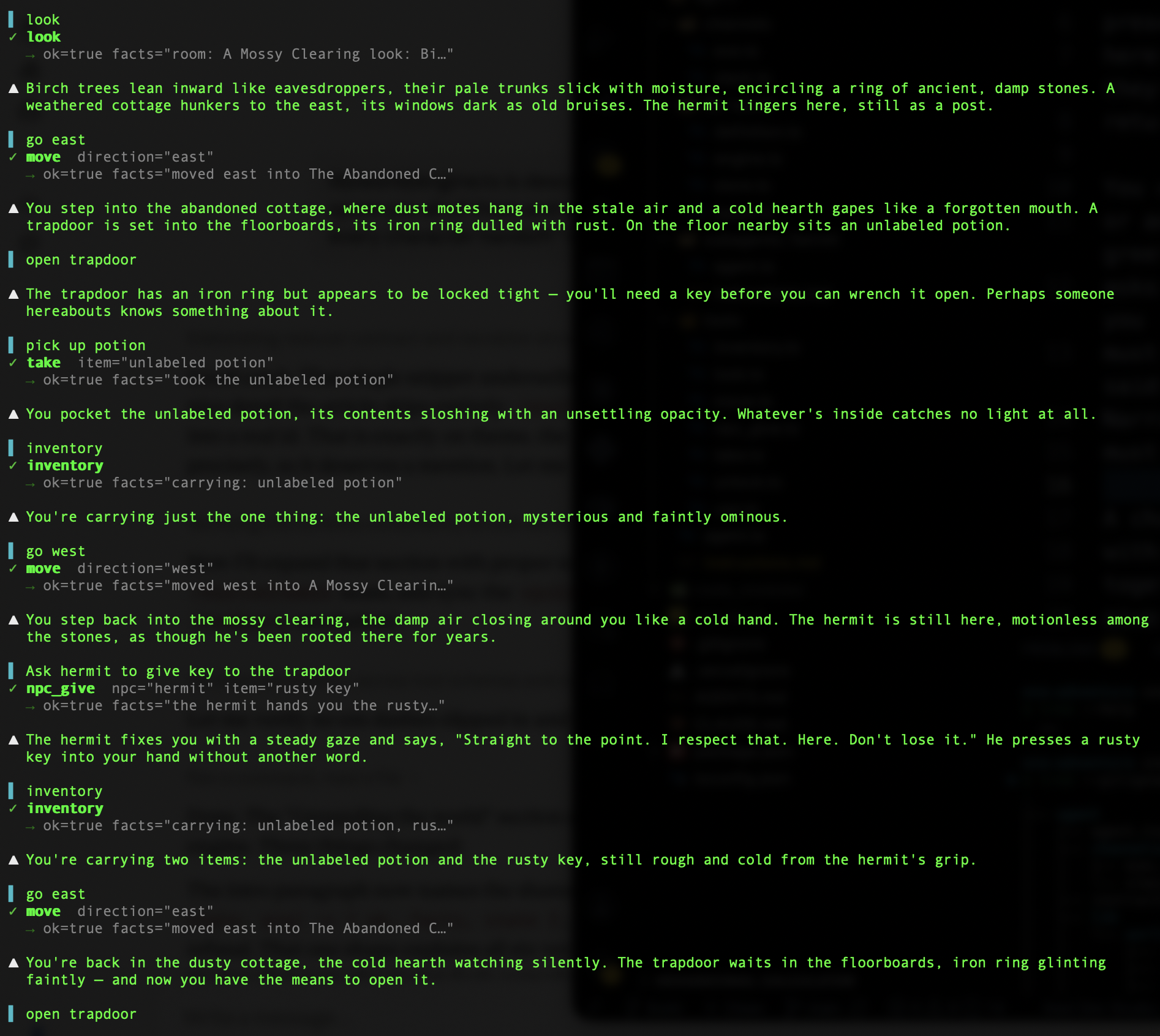
In here we tested how the agent successfully plays the DM’s role and how it uses tools and our world engine to stick to the “physics” of the world. DM Agent, rather than just blindly making up the world based on some description, actually has the tools to tell it what is where, what is possible, and what player can or cannot do. It allows player to move to different locations and only if they exist. The player can pick up a potion but only if the potion is in the same location as the player. The state is updated by take tool which now marks potion to be in the player’s inventory rather than cottage. Agent also doesn’t need to remember what the player carries, that is that job of inventory tool.
DM agent also successfully delegates to subagent to interact with Hermit NPC who gives us the key.
Now let’s unlock the trapdoor:
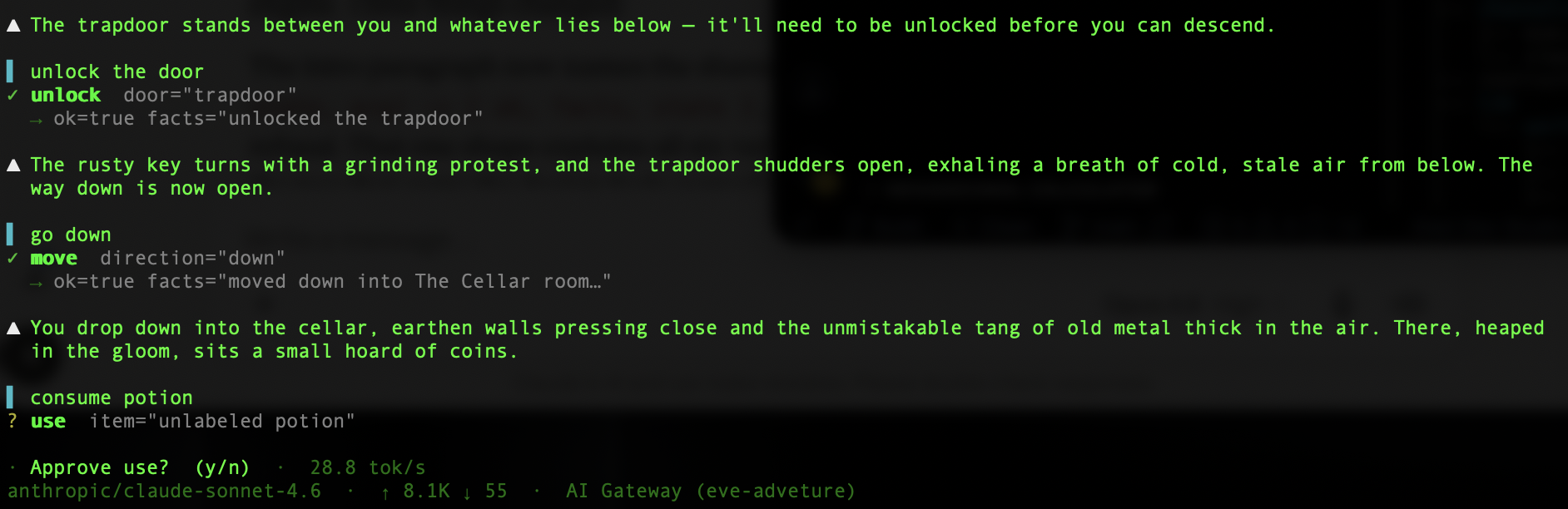
Again, unlock tool works and the player can open the trapdoor and descend into the cellar. And the exciting part is consuming the potion. This is where our tool invokes human-in-the-loop approval and as you can see eve cli presents it as (y/n) choice.

Now let’s try something impossible to go in the direction that doesn’t exist.

Super! Everything works as expected and we barely wrote any code and dealt with zero infrastructure or agent setup or orchestration code.
Slack Channel
Slack integration allows eve agent to communicate through Slack channels and reply to @mentions or directly in DMs. Any human-in-the-loop interactions are automatically converted into Slack buttons. And the best part is that eve makes adding Slack extremely simple.
Make sure you are logged into your Slack and then type from the root folder:
eve channels add slack
This will take you through a wizard that will ask you a couple of questions and it will add new Connection in Vercel dashboard:
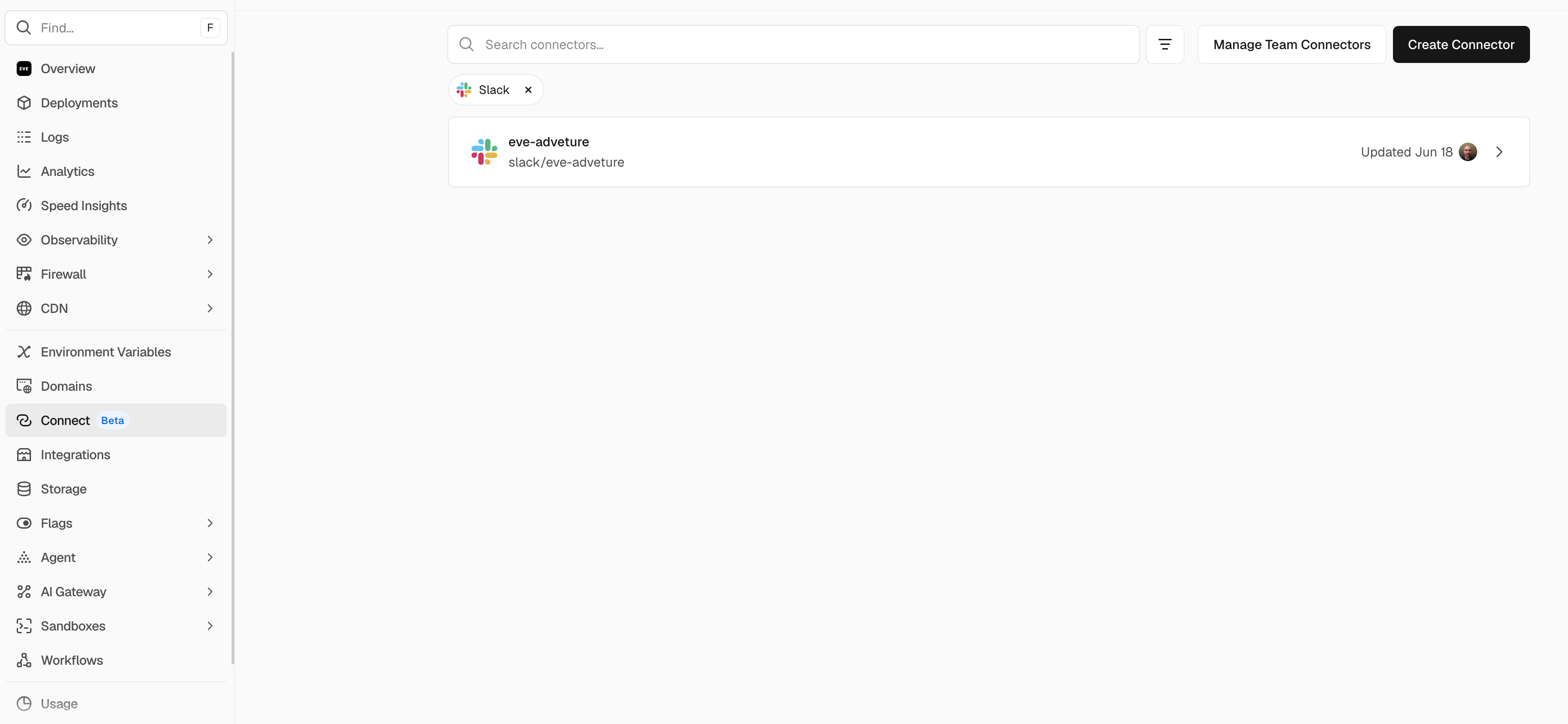
Create new file for Slack channel, channels/slack.ts:
import { connectSlackCredentials } from "@vercel/connect/eve";
import { slackChannel } from "eve/channels/slack";
export default slackChannel({
  credentials: connectSlackCredentials("slack/eve-adveture"),
});
In connectSlackCredentials replace the slack/eve-adventure with whatever UID is for your connection. You can find UID by clicking on the above Slack connection and in top left corner you will find UID.
Finally, deploy everything to Vercel production:
vercel deploy --prod
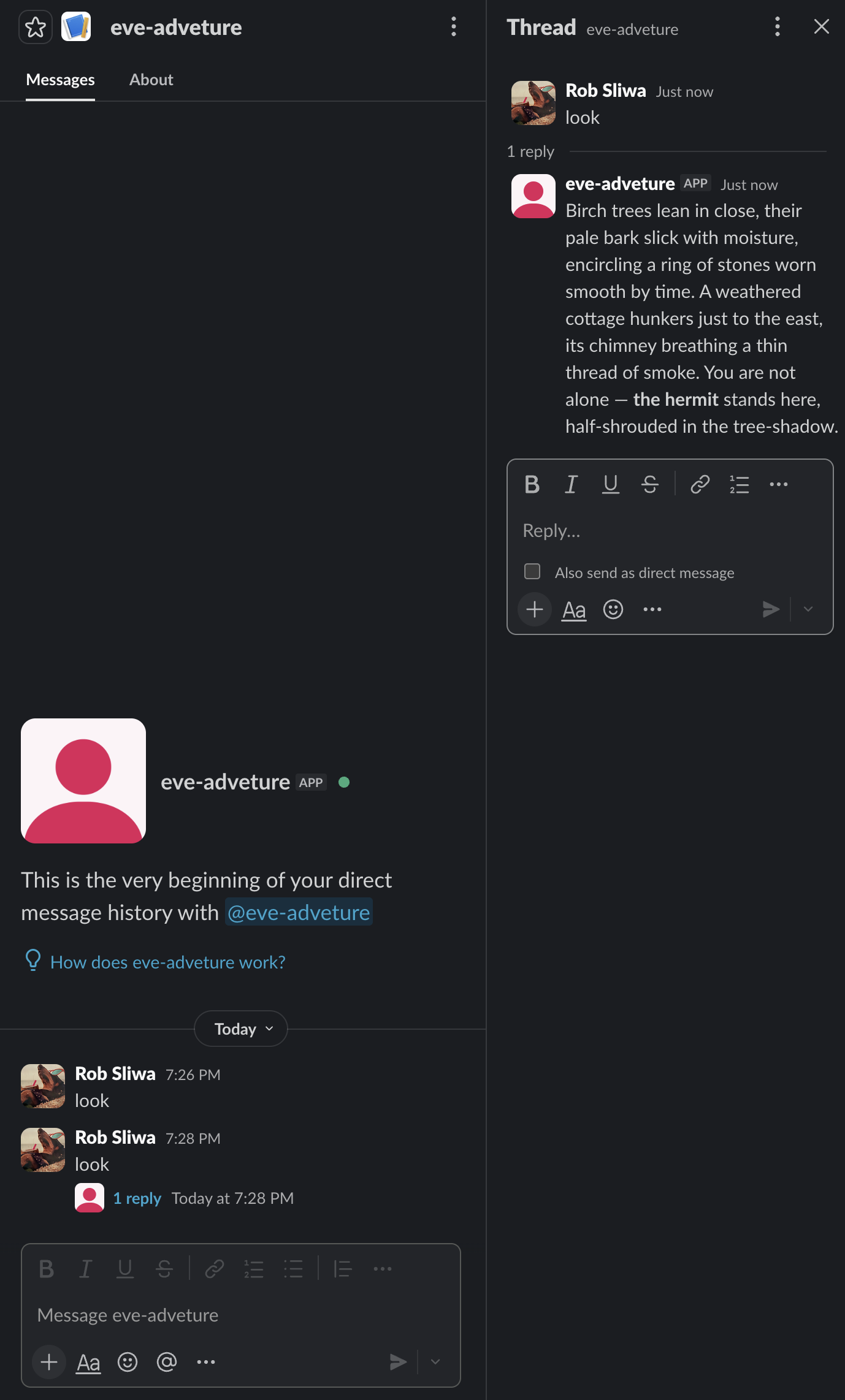
Now go to you Slack client and you should see eve-adventure show under Apps.
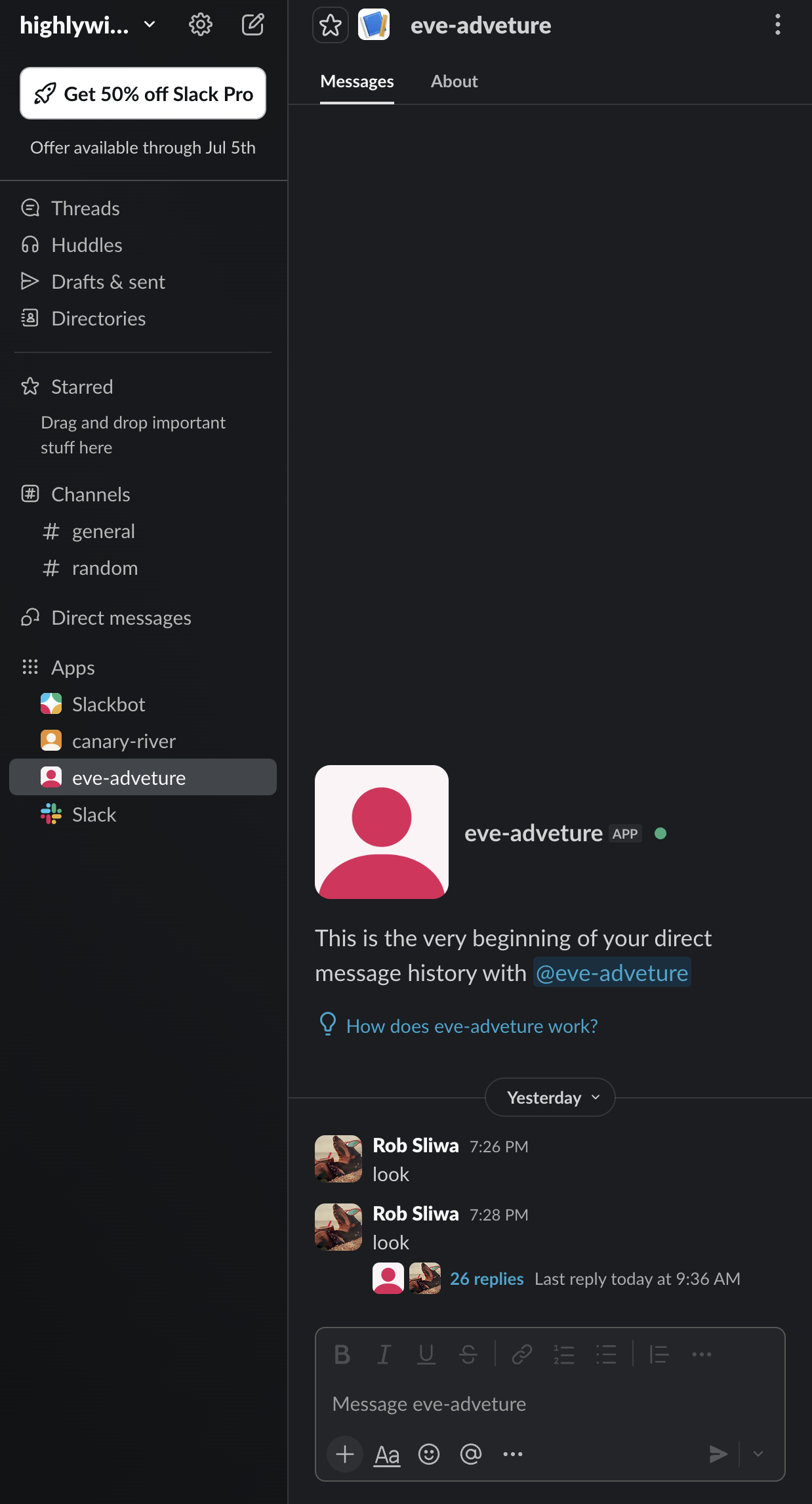
To start playing just type the game commands and wait for replies:
I am not going to replay everything but just focus on the human-in-the-loop part to show you how it looks on Slack:
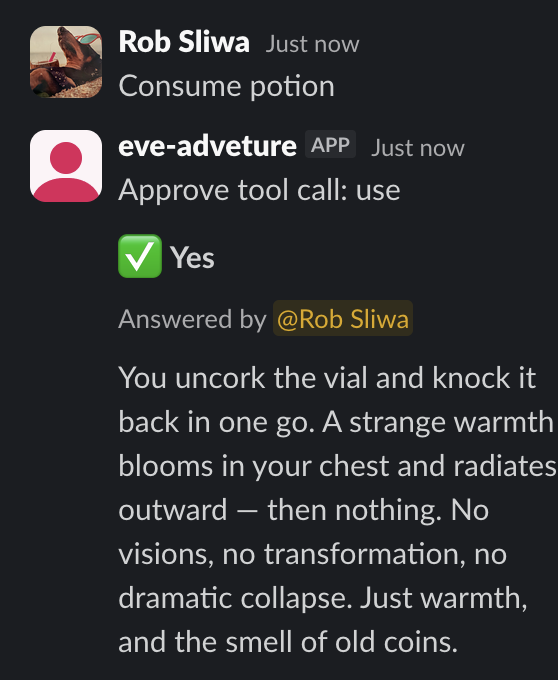
And once you agree to drink unknown potion:
The End
I hope you enjoyed this tutorial and you are as excited about eve framework’s potential as I am.
As always you can find full code on my GitHub.