Our game has come a long way. But let’s be honest, it looks a bit like a spreadsheet from 1996.
Text adventures are powerful because they happen in the imagination but a little visual flare would go a long way towards creating the atmosphere of the damp walls of the hallway or the glass ceiling of the atrium.
However, we have a performance constraint. If we add a high resolution PNG to every room, our snappy 10ms page loads will suddenly balloon to 500ms or more while the browser downloads the artwork. We don’t want to sacrifice that “instant” feel just to show a picture.
And we have a second problem. As the player gets engrossed in the game, the game log will grow into thousands of lines. Sending the entire HTML blob every time the player moves to a new room is wasteful and slows down the DOM.
In this chapter, we are going to solve both performance problems using techniques called: Lazy Loading and Infinite Scrolling.
We will tell the browser to load the critical stuff (the text and UI) right now. Fetch the heavy stuff (images and old history) only when you need it.
Painting the Scene
The pattern for lazy loading with HTMX is incredibly simple. Instead of putting and <img> tag directly in you HTML, you put a placeholder (like a spinner or a blank div) and tell it to load the real image immediately after the page renders.
This allows the browser to paint the UI instantly, and then “fill in” the gaps.
The Mental Model: hx-trigger="load"
We’ve used triggers like click (default), submit, and keyup. Now we meet load.
<div hx-get="/heavy-content" hx-trigger="load">
  Loading...
</div>
When HTMX sees this element appear in the DOM, it immediately fires the request. It’s like an automatic AJAX call that happens right after the page is ready.
Update the Data Model
First, our rooms need pictures. Open internal/game/model.go and add an Image field to the Room struct.
type Room struct {
	ID          string
	Name        string
	Description string
	Image       string // filename of the room image
	Exits       []Exit
}
Now let’s update our world data in cmd/adventure/main.go. Since we don’t have an art department (and trust me, you don’t want to see my drawings), we’ll use a placeholder service that generates placeholder images. Feel free to replace them with your own art.
rooms := map[string]game.Room{
    "hallway": {
        ID:          "hallway",
        Name:        "The Hallway",
        Description: "You are standing in a dimly lit hallway. Dust motes dance in the air.",
        Image:       "https://placehold.co/600x200/2a2a2a/33ff00?text=THE+HALLWAY&font=roboto",
        Exits: []game.Exit{
            {Label: "Go North", To: "atrium"},
        },
    },
    "atrium": {
        ID:          "atrium",
        Name:        "The Atrium",
        Description: "You step into a grand atrium. The ceiling is glass, revealing a grey sky.",
        Image:       "https://placehold.co/600x200/2a2a2a/c5a059?text=THE+ATRIUM&font=roboto",
        Exits: []game.Exit{
            {Label: "Go South", To: "hallway"},
        },
    },
}
The Image Endpoint
We need a dedicated endpoint that returns just the image HTML. Why not just return the URL? Because HTMX swaps HTML. By returning the full <img> tag, we can control classes, fading animations, and styles from the server.
Open internal/web/handlers.go and add the handler:
func (s *Server) handleRoomImage(w http.ResponseWriter, r *http.Request) {
	// Artificial delay so you can perceive the "lazy" loading effect on localhost
	// time.Sleep(500 * time.Millisecond)

	roomID := r.PathValue("id")
	room, ok := s.Rooms[roomID]
	if !ok {
		http.NotFound(w, r)
		return
	}

	if room.Image == "" {
		w.WriteHeader(http.StatusNoContent)
		return
	}

	// We return the img tag directly.
    // In a bigger app, you might use a small template fragment.
	html := fmt.Sprintf(`<img src="%s" alt="%s" class="room-image fade-in">`, room.Image, room.Name)

	w.Header().Set("Content-Type", "text/html; charset=utf-8")
	fmt.Fprint(w, html)
}
Don’t forget to register it in Routes():
mux.HandleFunc("GET /room/{id}/image", s.handleRoomImage)
Updating the View
Now, let’s carve out a space in our room template for this image. Open templates/room.html. We’ll place the image container right inside the .main column, above the Room Name.
<main class="main">
  <div class="room-visual"
       hx-get="/room/{{.Room.ID}}/image"
       hx-trigger="load"
       hx-swap="innerHTML">

       <div class="visual-skeleton"></div>
  </div>

  <h1>{{.Room.Name}}</h1>
And add some CSS to templates/room.html to handle the layout and the fade-in animation. This makes the transition feel pretty.
.room-visual {
  width: 100%;
  height: 200px;
  background: #111;
  border-radius: 4px;
  overflow: hidden;
  margin-bottom: 1.5rem;
  border: 1px solid #444;
  position: relative;
}

/* Skeleton Pulse Animation */
.visual-skeleton {
  width: 100%;
  height: 100%;
  background: linear-gradient(90deg, #1a1a1a 25%, #222 50%, #1a1a1a 75%);
  background-size: 200% 100%;
  animation: skeleton-loading 1.5s infinite;
}

@keyframes skeleton-loading {
  0% { background-position: 200% 0; }
  100% { background-position: -200% 0; }
}

.room-image {
  width: 100%;
  height: 100%;
  object-fit: cover;
  display: block;
}

.fade-in {
  animation: fadeIn 500ms ease-in;
}

@keyframes fadeIn {
  from { opacity: 0; }
  to { opacity: 1; }
}
Run It
Restart the server. When you visit a room, notice what happens:
- The page loads instantly with the “skeleton” box pulsating.
- A split second later, the image fades in smoothly.
We have decoupled the “heavy” visual asset from the critical navigation path. Even if the images takes 3 second to load, the player can still read the text and click exits immediately.
Infinite Scroll
Now for the second performance killer: the log.
If a player has been playing for an hour, they might have 500 log entries. Currently, handleRoom fetches the entire log and renders it. That’s a lot of DOM nodes to serialize and parse on every single movement.
We want to implement Infinite Scroll, but in reverse. We want to load the newest 30 lines immediately. If the player scrolls up to the top of the log to see what happened 10 minutes ago, then we fetch older entries.
The Mental Model: hx-trigger="intersect"
HTMX provides a specialized trigger called intersect. It fires when an element enters the browser’s viewport (becomes visible).
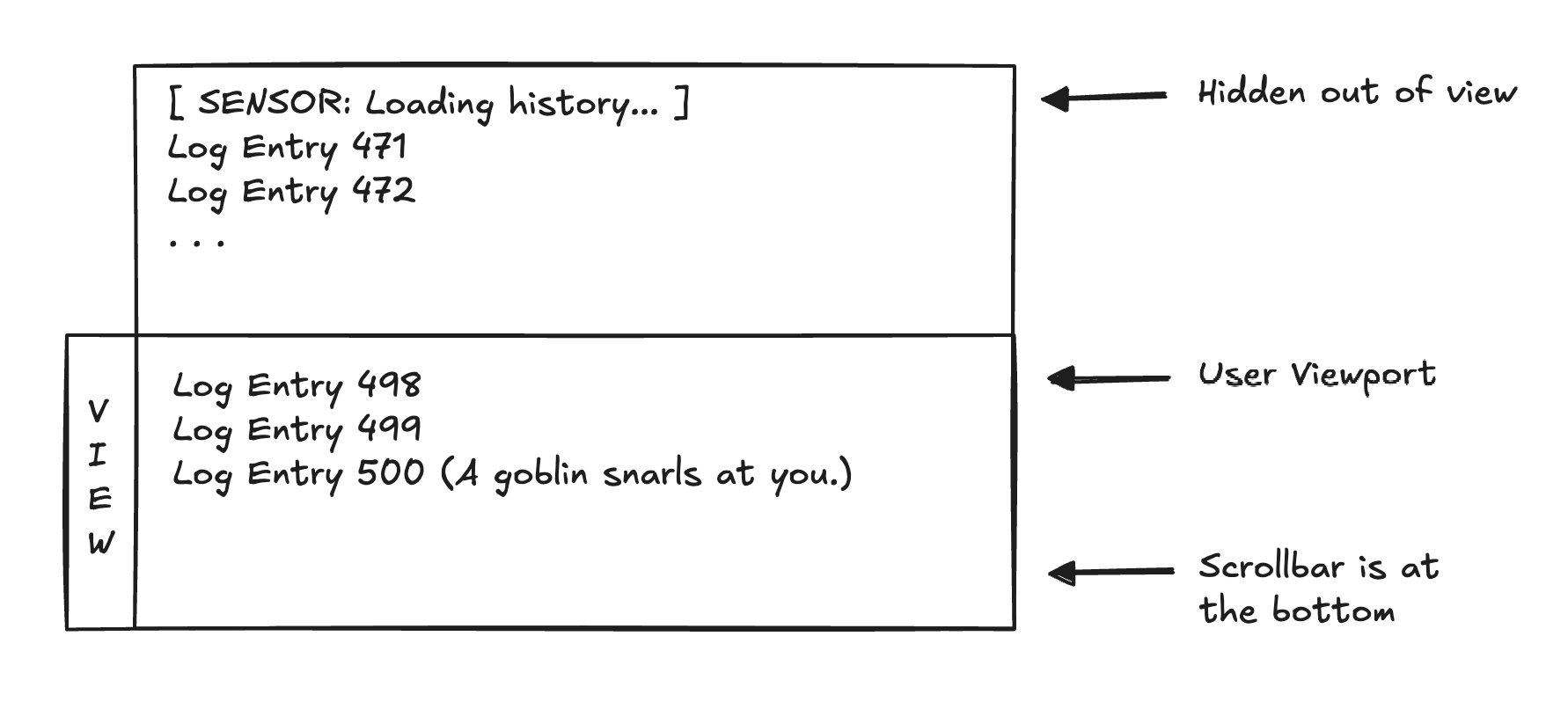
We will place a “sensor” element at the very top of our log list.
- When the page loads, the log is scrolled to the bottom (showing new stuff).
- The user scrolls up.
- The sensor at the top comes into view.
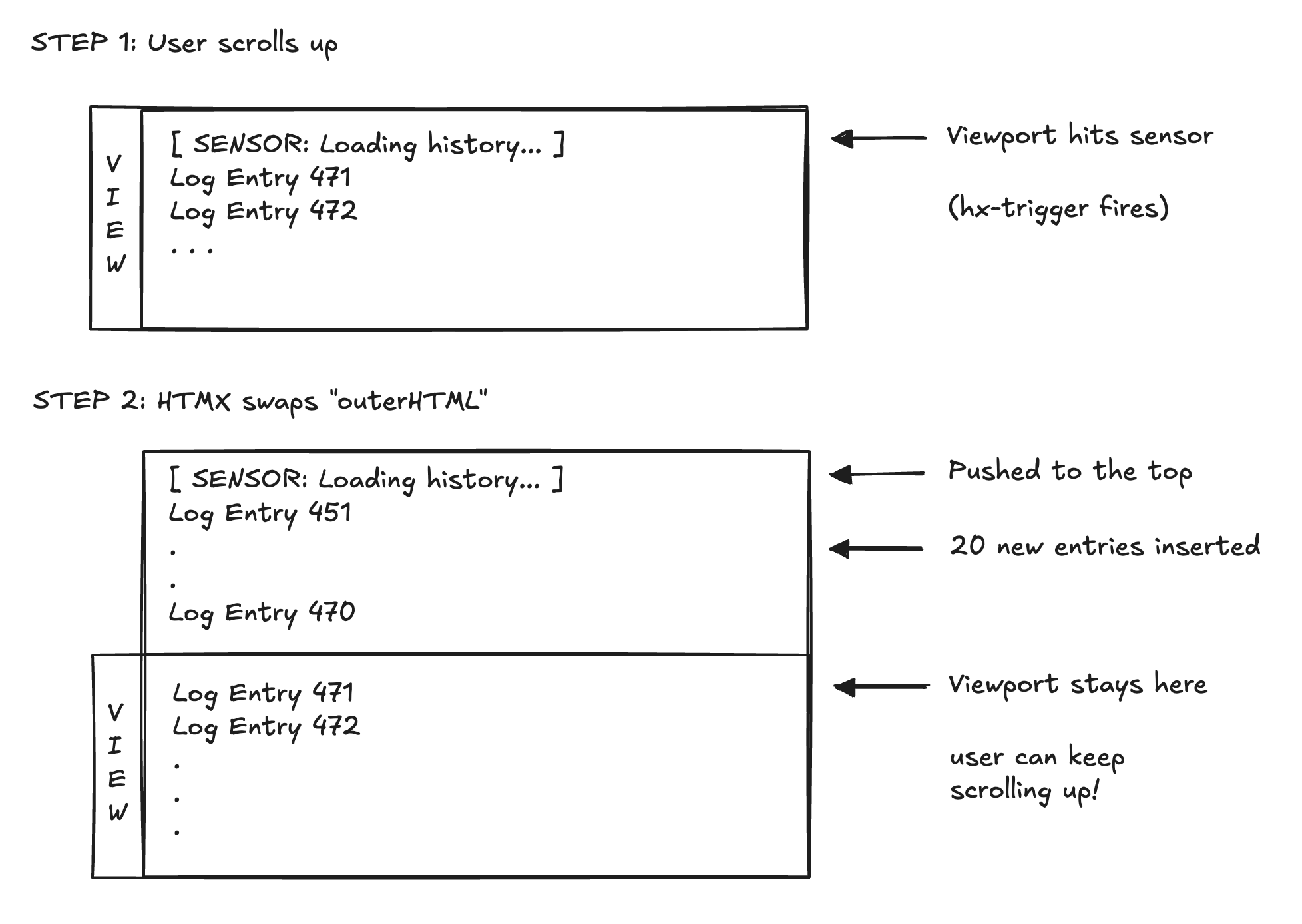
intersectfires.- HTMX fetches older logs and inserts them at the top (
afterbegin).
Here is how that looks conceptually when the page first loads and the player is at the bottom of the log:
Slicing the State
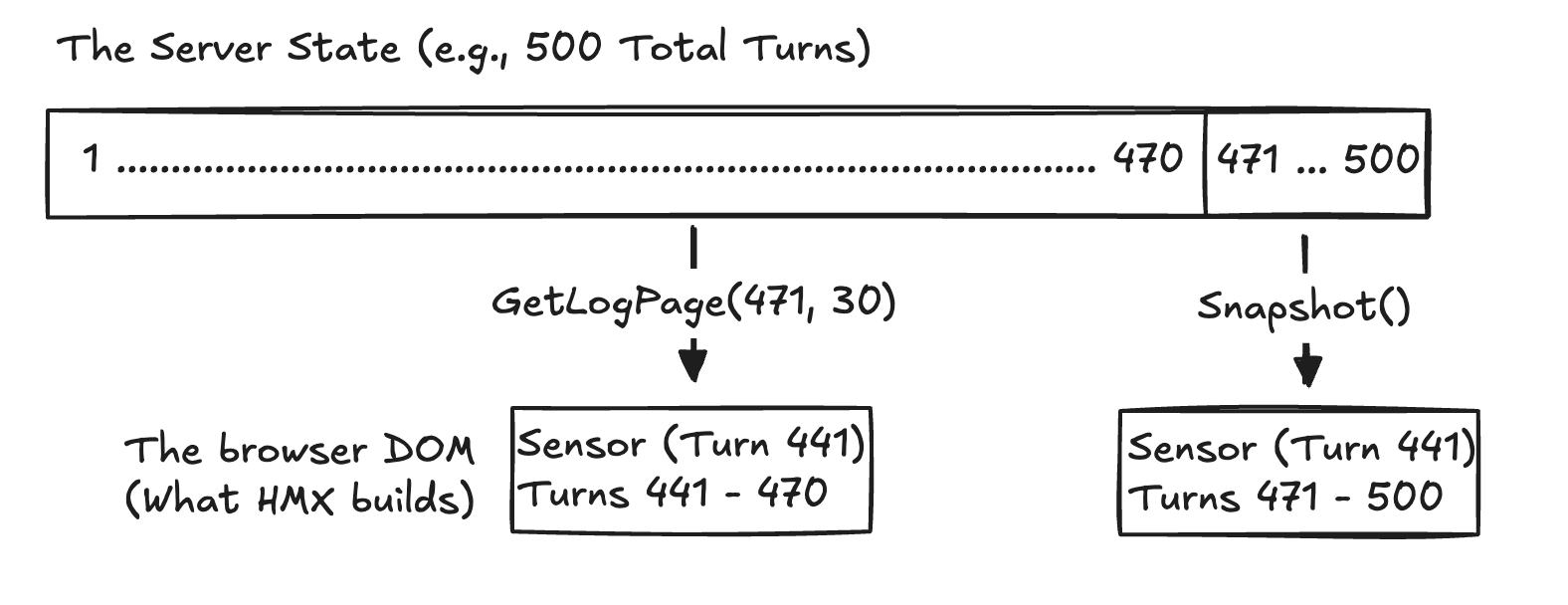
First, we need to be able to ask GameState for a specific slice of history.
Open internal/game/state.go. We currently have Snapshot() which returns everything. Let’s modify how we access logs.
We’ll add a helper to GameState to fetch a page of logs ending at a specific turn.
Visually, we want to separate the massive log history stored in the server’s memory from the small, lightweight chunk rendered in the browser’s DOM:
// GetLogPage returns up to `limit` log entries that occurred BEFORE `beforeTurn`.
// If beforeTurn is 0, it returns the most recent entries.
func (s *State) GetLogPage(beforeTurn int, limit int) ([]LogEntry, int) {
	s.mu.Lock()
	defer s.mu.Unlock()

	total := len(s.Log)
	if total == 0 {
		return nil, 0
	}

	// If 0, start from the very end
	endIndex := total
	if beforeTurn > 0 {
	// Find the index where Turn < beforeTurn.
    // Since logs are append-only and sorted by turn, we can search backwards
    // or just rely on the fact that Turn correlates to index roughly.
    // For safety, let's just loop backwards to find the cut-off.
		for i := total - 1; i >= 0; i-- {
			if s.Log[i].Turn < beforeTurn {
				endIndex = i + 1
				break
			}
            // If we hit the start and everything is >= beforeTurn (unlikely), endIndex becomes 0
            if i == 0 {
                endIndex = 0
            }
		}
	}

	startIndex := endIndex - limit
	if startIndex < 0 {
		startIndex = 0
	}

	// Create a copy to return
	page := make([]LogEntry, endIndex-startIndex)
	copy(page, s.Log[startIndex:endIndex])

	// Return the entries and the Turn ID of the earliest entry
    // (to serve as the cursor for the next page).
    remainingCursor := 0
    if len(page) > 0 {
        remainingCursor = page[0].Turn
    }

	return page, remainingCursor
}
Now, update Snapshot() in state.go. We don’t want it returning the whole log anymore. Let’s make it return just the recent history say, last 30 lines by default.
func (s *State) Snapshot() Snapshot {
	s.mu.Lock()
	defer s.mu.Unlock()

    // Grab the last 30 entries for the initial view
    count := len(s.Log)
    start := count - 30
    if start < 0 { start = 0 }

	logCopy := append([]LogEntry(nil), s.Log[start:]...)

    // ... rest of the function (Inventory, etc) ...
}
By changing this, handleRoom will now automatically only render the last 30 lines. This gives us an immediate performance win.
But now we can’t see older turns. We need and endpoint to fetch them.
The History Endpoint
Open internal/web/handlers.go. We need a handler that:
- Accepts a
beforequery parameter, the turn ID. - Returns a list of
logEntrytemplates. - Includes a new sensor element at the top if there are still more logs to load.
Because we’ll be using `hx-swap=“outerHTML”, the response from this endpoint will completely replace the old sensor that triggered the fetch. HTMX inserts the newly fetched older logs, and pushes a new sensor to the very top:
func (s *Server) handleLogHistory(w http.ResponseWriter, r *http.Request) {
    state := s.Sessions.Get(w, r)

    // Parse "before" param
    var beforeTurn int
    fmt.Sscanf(r.URL.Query().Get("before"), "%d", &beforeTurn)

    // Fetch 20 older entries
    entries, earliestTurn := state.GetLogPage(beforeTurn, 20)

    if len(entries) == 0 {
        w.WriteHeader(http.StatusNoContent)
        return
    }

    w.Header().Set("Content-Type", "text/html; charset=utf-8")

    // If there is still more history before this page, we need to put the sensor back at the top.
    // If earliestTurn is 1, we are at the beginning of time.
    if earliestTurn > 1 {
        fmt.Fprintf(w,
            `<div hx-get="/log-history?before=%d"
                  hx-trigger="intersect once"
                  hx-swap="outerHTML"
                  class="log-sensor">Loading history...</div>`,
            earliestTurn,
        )
    }

    // Render the entries
    for _, entry := range entries {
        if err := s.Tmpl.ExecuteTemplate(w, "logEntry", entry); err != nil {
            continue
        }
    }
}
Register it in Routes():
mux.HandleFunc("GET /log-history", s.handleLogHistory)
Wiring the Sensor
Now we go to templates/room.html. We need to place the initial sensor at the top of our log container.
We only want to appear if there is actually history to load. We can detect this in the template, if the first log entry has Turn > 1, we probably have history hidden.
Update the #log container logic:
<div id="log" class="log" aria-live="polite" aria-relevant="additions text">

  {{/* If the first entry isn't the start of the game (Turn 1), show the loader */}}
  {{$first := index .Log 0}}
  {{if and $first (gt $first.Turn 1)}}
    <div hx-get="/log-history?before={{$first.Turn}}"
         hx-trigger="intersect once"
         hx-swap="outerHTML"
         class="log-sensor">
         Loading history...
    </div>
  {{end}}

  {{range .Log}}
    {{template "logEntry" .}}
  {{else}}
    <div class="log-entry system">
      <div class="output">The world is quiet. Type <code>help</code> or <code>look</code>.</div>
    </div>
  {{end}}
</div>
And add CSS for the sensor so it’s unobtrusive:
.log-sensor {
  text-align: center;
  font-size: 0.8rem;
  color: #555;
  padding: 0.5rem;
  font-style: italic;
}
Small Bug
Notice that so far we ensured that when new message comes in it gets added to the bottom of the log. However, when the pages switch we don’t show the last message but the first one. So let’s quickly fix this.
Open templates/room.html.
Add this script to the very bottom of <body>, just before the closing </body> tag.
<script>
      (function() {
        var log = document.getElementById("log");
        if (log) {
          log.scrollTop = log.scrollHeight;
        }
      })();
    </script>
  </body>
</html>
Run It
- Restart the server.
- Play the game. Type lots of commands.
look,wait, look,wait`. - Do this until you have more than 30 entries.
- Refresh the page.
- You should only see the last 30 entries. The scrollbar should be at the bottom.
- Scroll up to the top.
- You should see “Loading history…” briefly, and then the older commands appear.
Summary
We have turned our simple HTML page into a performant application that can scale to thousands of turns and rich media.
- Lazy Images keep the initial paint fast while fetching heavy assets in the background.
- Infinite Scroll keeps the DOM light by capping the initial payload, fetching history only when the user explicitly asks for it by scrolling.
In the next article, we’re going to make the world alive. What happens if a goblin walks into the room while you’re just standing there? Right now? Nothing. You’d have to refresh the page. We’ll implement Polling to create a live map and reactive events. The dungeon is about to start moving on its own.
Code
You can find full code on GitHub.